
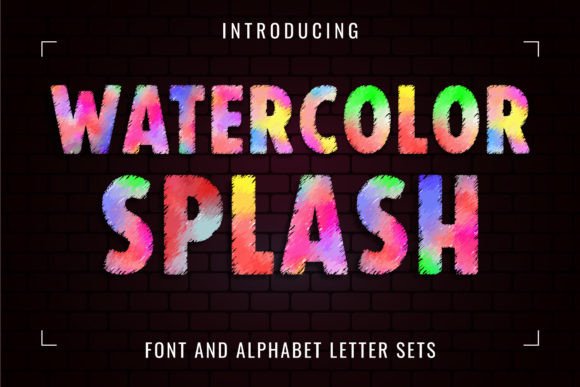
Watercolor Splash Font: Add a Pop of Color to Your Designs
Are you looking for a font that can add a touch of vibrancy and creativity to your designs? Look no further than the Watercolor Splash Font. This colorful watercolor font style is designed to make a visual impact, with brightly colored letters that are sure to grab attention. In this article, we’ll take a closer look at the Watercolor Splash Font, its features, and how you can use it to elevate your designs.
What is Watercolor Splash Font?
Watercolor Splash Font is a unique and colorful font style that is perfect for creating eye-catching designs. The font features brightly colored letters with a watercolor effect, giving it a playful and artistic feel. The font is designed to be versatile and can be used for a variety of projects, from postcards and tote bags to t-shirts and more.
Ideas for Using Watercolor Splash Font
The Watercolor Splash Font is perfect for a variety of design projects, including:
- Postcards: Add a pop of color to your postcards with this vibrant font.
- Tote bags: Create eye-catching tote bags with this fun and playful font.
- T-shirts: Design unique and colorful t-shirts with this font.
- Children’s design: The Watercolor Splash Font is perfect for designing materials for kids, such as coloring books, activity sheets, and more.
- Vibrant advertising: Use this font to create eye-catching ads that grab attention.
- Colorful identity: Add a touch of personality to your brand with this colorful font.
Font Compatibility
The Watercolor Splash Font comes in two versions: a color version and a black version. The black version is compatible with Cricut Design Space and other cutting machines, making it perfect for projects that require cutting. However, the color version is only compatible with certain design programs, including:
- PhotoShop
- Illustrator
- Silhouette
- Inkscape
Note that the OTF and/or TTF files of the color version are not compatible with Cricut. For more information on how to use this type of font, please check our Ultimate Font Guide.
Tips for Using Watercolor Splash Font
Here are some tips for getting the most out of the Watercolor Splash Font:
- Experiment with different colors: The Watercolor Splash Font is all about color, so don’t be afraid to experiment with different color combinations.
- Use it for headlines: The font is perfect for headlines and titles, where you want to grab attention.
- Pair it with a simple font: For body text, pair the Watercolor Splash Font with a simple font to create contrast.
- Use it for kids’ projects: The font is perfect for designing materials for kids, such as coloring books and activity sheets.
Benefits of Using Watercolor Splash Font
The Watercolor Splash Font offers a range of benefits, including:
- Unique and eye-catching designs: The font is sure to grab attention and add a touch of personality to your designs.
- Versatility: The font can be used for a variety of projects, from postcards and tote bags to t-shirts and more.
- Easy to use: The font is easy to install and use, even for those who are new to design.
Watercolor Splash Font: Access Download Now
| Font Name | Watercolor Splash Font |
| Author | Font Craft Studio |
| Download | Access Download Here |
Conclusion
The Watercolor Splash Font is a unique and colorful font style that is perfect for adding a touch of vibrancy and creativity to your designs. With its brightly colored letters and watercolor effect, it’s sure to grab attention and add a touch of personality to your projects. Whether you’re designing postcards, tote bags, t-shirts, or more, this font is perfect for creating eye-catching designs that stand out.
