
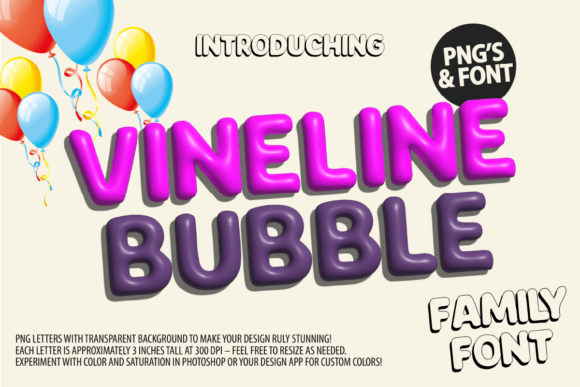
Vineline Bubble Font: A Brazen Gold 3D-Style Balloon SVG Font
Are you looking for a unique and eye-catching font to add to your digital or print projects? Look no further than the Vineline Bubble Font, a stunning 3D-style balloon SVG font that’s sure to turn heads. In this article, we’ll take a closer look at this exciting font, its features, and how to use it to take your designs to the next level.
Key Features of Vineline Bubble Font
- 3D-Style Balloon Design: The Vineline Bubble Font features a brazen gold 3D-style balloon design that’s perfect for adding a touch of luxury and sophistication to your projects.
- SVG Font: This font is an SVG (Scalable Vector Graphics) font, which means it’s made up of vector shapes that can be scaled up or down without losing any quality.
- Compatibility: The Vineline Bubble Font is compatible with Photoshop CC 2017, Illustrator CC 2018, or Procreate 4.3 (or newer).
- Maximum Size: The font is designed for digital use up to 700 pixels high (without loss of quality) and for print no bigger than 5cm at 300dpi (without loss of quality).
- Color Options: The font comes in a color version, which can be tweaked using the included instructions (Photoshop only).
Usage Guidelines for Vineline Bubble Font
To get the most out of the Vineline Bubble Font, it’s essential to follow some usage guidelines. Here are a few things to keep in mind:
- Digital Use: The font is designed for digital use up to 700 pixels high. Using it at larger sizes may result in a loss of quality.
- Print Use: For print use, the font should not be used at sizes larger than 5cm at 300dpi. Again, using it at larger sizes may result in a loss of quality.
- Color Version: The color version of the font is only compatible with certain design programs, including Photoshop, Illustrator, Silhouette, and Inkscape.
- Cricut Compatibility: The black version of the font is compatible with Cricut Design Space and other cutting machines. However, the color version is not compatible with Cricut.
Instructions for Use
To use the Vineline Bubble Font, follow these steps:
- Download and Install: Download the font files and install them on your computer.
- Open Your Design Program: Open your design program of choice (e.g., Photoshop, Illustrator, etc.).
- Select the Font: Select the Vineline Bubble Font from your font library.
- Type Your Text: Type your text using the font.
- Tweak the Color (optional): If using the color version, follow the included instructions to tweak the color to your liking (Photoshop only).
For More Information: The Ultimate Font Guide
If you’re new to using SVG fonts or need more information on how to use the Vineline Bubble Font, be sure to check out our Ultimate Font Guide. This comprehensive guide covers everything you need to know about using SVG fonts, including:
- What are SVG Fonts?
- How to Install SVG Fonts
- How to Use SVG Fonts in Different Design Programs
- Tips and Tricks for Getting the Most Out of Your SVG Fonts
Vineline Bubble Font: Access Download Now
| Font Name | Vineline Bubble Font |
| Author | Muctype |
| Download | Access Download Here |
Conclusion
The Vineline Bubble Font is a stunning 3D-style balloon SVG font that’s perfect for adding a touch of luxury and sophistication to your digital or print projects. With its brazen gold design and compatibility with popular design programs, this font is sure to turn heads. By following the usage guidelines and instructions for use, you can get the most out of this exciting font and take your designs to the next level.
