
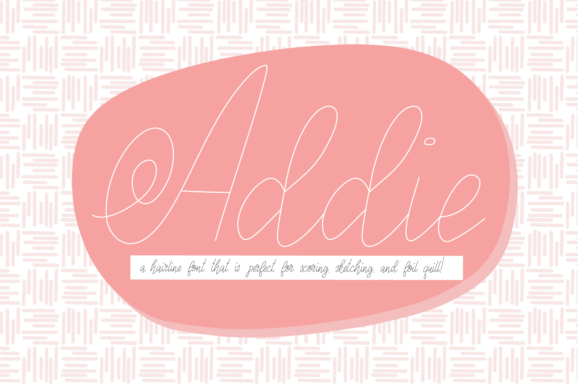
Addie Font: The Perfect Hairline Font for Your Next Crafting Project
If you’re looking for a unique and quirky hairline font for your next crafting project, look no further than Addie Font. This hairline font is specifically designed for use with cutting machines like Glowforge, Silhouette, or Cricut, and is perfect for scoring, sketch pens, or foil quill projects. In this article, we’ll take a closer look at the features and benefits of Addie Font, and explore how to get the most out of this versatile font.
Unique and Quirky Hairline Design
Addie Font features a unique and quirky hairline design that is perfectly thin for use with cutting machines. The font was created based on the letters of the Ashleigh font, and has been carefully crafted to provide a solid letter with no pesky center void. This makes it ideal for use with Glowforge, Silhouette, or Cricut machines, and ensures a professional-looking finish for your crafting projects.
📸 Preview Images

💡 Click on any image to view full size
Tips for Using Addie Font
To get the most out of Addie Font, it’s essential to use it correctly in your cutting machine software. Here are a few tips to help you achieve the best results:
- Change to no-fill: When using Addie Font in your cutting machine software, make sure to change the fill setting to “no-fill”. This will ensure that the font cuts out as a solid letter, rather than a filled shape.
- Add a line color: To create a solid letter with no center void, add a line color to your font. This will help the cutting machine to recognize the font as a single, solid shape.
- Adjust settings as needed: Depending on your specific cutting machine and software, you may need to adjust the settings to achieve the best results. Experiment with different settings to find what works best for you.
Compatibility with Cutting Machines
Addie Font is specifically designed for use with cutting machines like Glowforge, Silhouette, or Cricut. The font is optimized for use with these machines, and is compatible with a range of software programs. Whether you’re using a Glowforge, Silhouette, or Cricut machine, you can be confident that Addie Font will work seamlessly with your equipment.
The Inspiration Behind Addie Font
Addie Font was created based on the letters of the Ashleigh font. The designer wanted to create a hairline font that was unique and quirky, yet still elegant and sophisticated. The result is a font that is perfect for a range of crafting projects, from paper crafting to foil quilling.
Note on Font Previewers
Please note that Addie Font may look off in font previewers due to how it was made specifically for scoring, sketch pens, and foil quill, not for print. This is because font previewers are often designed for print use, and may not accurately reflect the font’s performance in cutting machine software. Don’t let this deter you – Addie Font is a high-quality font that is perfect for use with cutting machines.
Crafting Projects with Addie Font
Addie Font is perfect for a range of crafting projects, including:
- Paper crafting: Use Addie Font to create beautiful paper crafts, such as cards, gift tags, and scrapbook pages.
- Foil quilling: Addie Font is ideal for use with foil quilling techniques, and can be used to create intricate and delicate designs.
- Sketch pens: Use Addie Font with sketch pens to create beautiful, hand-drawn designs.
- Scoring: Addie Font is perfect for use with scoring tools, and can be used to create crisp, clean folds in your paper crafts.
Addie Font: Access Download Now
| Font Name | Addie Font |
| Author | Unknown |
| Download | Access Download Here |
Conclusion
In conclusion, Addie Font is a unique and quirky hairline font that is perfect for use with cutting machines like Glowforge, Silhouette, or Cricut. With its thin design and solid letter construction, Addie Font is ideal for a range of crafting projects, from paper crafting to foil quilling. By following the tips outlined in this article, you can get the most out of Addie Font and create beautiful, professional-looking crafts.
