
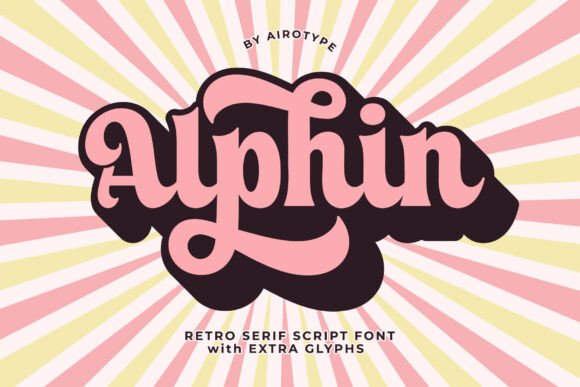
Introducing Alphin Font: A Retro Script Font with a Vintage and Modern Elegant Feeling
The world of typography is vast and diverse, with numerous fonts available for various design needs. One font that stands out for its unique blend of retro and modern elegance is the Alphin Font. This script font with a serif touch is perfect for designers looking to add a vintage and groovy style to their projects. In this article, we’ll explore the features and benefits of the Alphin Font, and why it’s an excellent choice for a wide range of design applications.
What is Alphin Font?
Alphin Font is a retro script font that exudes a vintage and modern elegant feeling. Its unique design combines the fluidity of script fonts with the sophistication of serif fonts, making it an excellent choice for designers seeking a distinctive look. The font features tons of alternate glyphs (extra characters), which can be accessed using Font Book on Mac or Character Map UWP on PC.
📸 Preview Images


💡 Click on any image to view full size
Key Features of Alphin Font
- Retro and Modern Elegance: Alphin Font boasts a unique blend of retro and modern styles, making it perfect for designers seeking a distinctive look.
- Script Font with Serif Touch: The font combines the fluidity of script fonts with the sophistication of serif fonts.
- Tons of Alternate Glyphs: Alphin Font features numerous alternate glyphs, which can be accessed using Font Book on Mac or Character Map UWP on PC.
- Extruded Style: The font includes an extruded style, which can be used to add a shadow or layer to the regular font.
Design Applications for Alphin Font
Alphin Font is an incredibly versatile font that can be used for a wide range of design applications. Its unique blend of retro and modern elegance makes it perfect for projects that require a distinctive look. Here are some design applications where Alphin Font shines:
Design Projects that Alphin Font is Perfect for
- Logo Design: Alphin Font is an excellent choice for logo design, especially for brands that want to convey a vintage or retro vibe.
- Crafting and DIY Projects: The font’s unique style makes it perfect for crafting and DIY projects, such as stickers, signs, and other handmade items.
- Branding and Packaging: Alphin Font can be used for branding and packaging design, adding a touch of elegance and sophistication to products.
- Quotes and Typography: The font’s script style makes it perfect for quotes and typography projects, adding a touch of elegance and sophistication to text.
- Sublimation and Heat Press: Alphin Font can be used for sublimation and heat press projects, such as custom apparel, mugs, and other items.
Tips for Using Alphin Font
To get the most out of Alphin Font, here are some tips for using it in your design projects:
Tips for Using Alphin Font
- Experiment with Alternate Glyphs: Alphin Font features tons of alternate glyphs, so experiment with different characters to add uniqueness to your design.
- Use the Extruded Style: The extruded style can add depth and dimension to your design, making it more visually appealing.
- Pair with Other Fonts: Alphin Font can be paired with other fonts to create a unique and interesting design.
- Adjust Font Size and Color: Experiment with different font sizes and colors to find the perfect combination for your design.
Alphin Font: Access Download Now
| Font Name | Alphin Font |
| Author | Unknown |
| Download | Access Download Here |
Conclusion
In conclusion, Alphin Font is a unique and versatile font that offers a blend of retro and modern elegance. Its script style with a serif touch, tons of alternate glyphs, and extruded style make it perfect for a wide range of design applications. Whether you’re designing a logo, crafting and DIY project, or branding and packaging design, Alphin Font is an excellent choice. By following the tips outlined in this article, you can get the most out of Alphin Font and create stunning designs that showcase your creativity.
Additional Resources
- Font Book (Mac): Learn how to access extra glyphs in Font Book on Mac.
- Character Map UWP (PC): Learn how to access extra glyphs in Character Map UWP on PC.
