
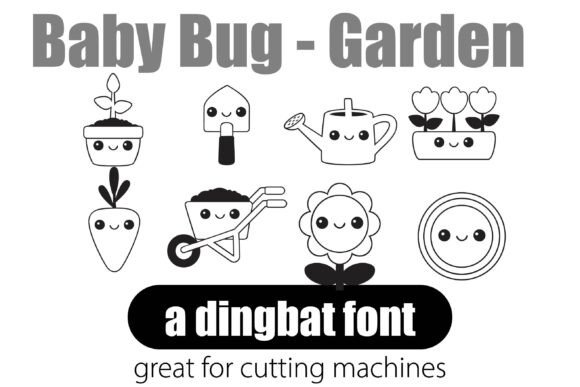
Baby Bug Garden Font: Elevate Your Projects with Kawaii-Style Graphics
Are you looking for a way to add a touch of whimsy and fun to your creative projects? Look no further than the Baby Bug Garden Dingbat Font, featuring 26 kawaii-style garden graphics. This versatile font is a designer’s secret weapon, bringing flair, fun, and functionality to any project.
What are Dingbats?
Dingbats are a type of font that consists of symbols, icons, and graphics rather than letters. They’re more than just symbols – they’re ready-to-use mini graphics that can save you time, simplify your process, and make your visuals pop. With dingbats, you can add visual interest to your projects without the need for image files or graphic software.
📸 Preview Images


💡 Click on any image to view full size
Baby Bug Garden Dingbat Font: Key Features
The Baby Bug Garden Dingbat Font is a unique and versatile font that offers a range of benefits. Its key features include:
- Easy to use: Simply type a letter to generate a unique graphic.
- Vector-quality icons: Perfect for print or digital use, these icons are scalable and stylish.
- Consistent line weight & style: For a cohesive look that’s sure to impress.
- Compatibility: Works seamlessly with Adobe, Canva, MS Office, and more.
Uses for the Baby Bug Garden Dingbat Font
The Baby Bug Garden Dingbat Font is perfect for a wide range of projects, including:
- Invitations: Add a touch of whimsy to your invitations and make them stand out.
- Packaging: Use the font to create eye-catching packaging that reflects your brand’s personality.
- Social media graphics: Elevate your social media graphics and make them more engaging.
- Newsletters: Add visual interest to your newsletters and keep your readers engaged.
- Labels, tags, or merch: Use the font to create custom labels, tags, or merchandise that reflects your brand’s style.
Benefits of Using Dingbat Fonts
Dingbat fonts like the Baby Bug Garden Dingbat Font offer a range of benefits, including:
- Time-saving: No need to spend hours searching for and editing images – simply type a letter to generate a unique graphic.
- Simplified process: Dingbats eliminate the need for graphic software or image files, streamlining your design process.
- Visual appeal: Dingbats add a touch of visual interest to your projects, making them more engaging and effective.
How to Use the Baby Bug Garden Dingbat Font
Using the Baby Bug Garden Dingbat Font is easy:
- Download and install the font on your computer.
- Open your design software (such as Adobe Illustrator or Canva).
- Select the Baby Bug Garden Dingbat Font from your font library.
- Type a letter to generate a unique graphic.
- Adjust the size and style to fit your needs.
Tips and Tricks for Getting the Most Out of the Baby Bug Garden Dingbat Font
Here are a few tips and tricks for getting the most out of the Baby Bug Garden Dingbat Font:
- Experiment with different sizes and styles: Find the perfect look for your project by experimenting with different sizes and styles.
- Combine with other fonts: Pair the Baby Bug Garden Dingbat Font with other fonts for a unique and eye-catching look.
- Use in combination with images: Use the font in combination with images for a visually appealing design.
Baby Bug Garden Font: Access Download Now
| Font Name | Baby Bug Garden Font |
| Author | Unknown |
| Download | Access Download Here |
Conclusion
The Baby Bug Garden Dingbat Font is a versatile and fun font that’s perfect for adding a touch of whimsy to your creative projects. With its easy-to-use design, vector-quality icons, and compatibility with a range of software, it’s a must-have for any designer or DIY enthusiast. So why wait? Download the Baby Bug Garden Dingbat Font today and start elevating your projects to the next level!
FAQs
- What is a dingbat font?
- A dingbat font is a type of font that consists of symbols, icons, and graphics rather than letters.
- What software is the Baby Bug Garden Dingbat Font compatible with?
- The Baby Bug Garden Dingbat Font is compatible with Adobe, Canva, MS Office, and more.
- How do I use the Baby Bug Garden Dingbat Font?
- Simply download and install the font, then type a letter to generate a unique graphic.
