
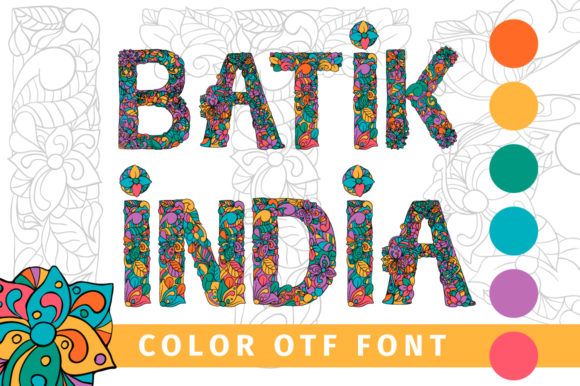
Batik India Font: Adding a Vibrant Twist to Your Creative Projects
Batik India Font is a stunning, colorful, and vibrant font that can add a lovely twist to any creative project. Its unique charm and character make it an excellent choice for designers, crafters, and artists looking to infuse their work with a touch of elegance and sophistication. In this article, we’ll explore the features and benefits of Batik India Font, its compatibility with various software, and provide a comprehensive guide on how to use this beautiful font.
What is Batik India Font?
Batik India Font is a color font, specifically an Opentype-SVG font, which means it’s a vector-based font that can be scaled up or down without losing its quality. This font is perfect for creating stunning designs, crafts, and artwork that require a high level of detail and precision. With its intricate patterns and vibrant colors, Batik India Font is sure to make your projects stand out.
Features of Batik India Font
- Colorful and Vibrant: Batik India Font features a wide range of colors that can add a pop of color to your designs.
- Unique Charm: This font has a distinctive charm that can add an extra layer of elegance to your projects.
- Scalable: As a vector-based font, Batik India Font can be scaled up or down without losing its quality.
- Compatible with Various Software: This font is compatible with popular software such as PhotoShop, Illustrator, Silhouette, and Inkscape.
Compatibility with Various Software
Batik India Font is compatible with a range of software, including:
- PhotoShop: This font can be used in PhotoShop to create stunning designs and artwork.
- Illustrator: Batik India Font can be used in Illustrator to create vector-based designs and graphics.
- Silhouette: This font is compatible with Silhouette software, making it perfect for crafters and makers.
- Inkscape: Batik India Font can be used in Inkscape to create stunning designs and artwork.
Important Note on Cricut Compatibility
Please note that the OTF and TTF files of Batik India Font are not compatible with Cricut. If you’re using Cricut, you’ll need to use a different font format or convert the font to a compatible format. For more information on how to use Batik India Font with Cricut, please check our Ultimate Font Guide.
How to Use Batik India Font
Using Batik India Font is easy! Here’s a step-by-step guide to get you started:
- Download and Install: Download the font files and install them on your computer.
- Open Your Software: Open your preferred software, such as PhotoShop or Illustrator.
- Select the Font: Select Batik India Font from your font library.
- Create Your Design: Create your design using the font.
Tips and Tricks for Using Batik India Font
Here are some tips and tricks to help you get the most out of Batik India Font:
- Experiment with Colors: Try out different color combinations to create unique and stunning designs.
- Play with Size: Experiment with different font sizes to create visual interest.
- Combine with Other Fonts: Combine Batik India Font with other fonts to create interesting and dynamic designs.
Batik India Font: Access Download Now
| Font Name | Batik India Font |
| Author | ilonitta.r |
| Download | Access Download Here |
Conclusion
Batik India Font is a beautiful, colorful, and vibrant font that can add a lovely twist to any creative project. With its unique charm and character, this font is perfect for designers, crafters, and artists looking to infuse their work with a touch of elegance and sophistication. By following our comprehensive guide, you can easily use Batik India Font in your projects and create stunning designs that showcase your creativity.
Ultimate Font Guide
For more information on how to use Batik India Font, including tutorials, tips, and tricks, please check our Ultimate Font Guide. This comprehensive guide covers everything you need to know about using color fonts, including installation, software compatibility, and design tips.
