
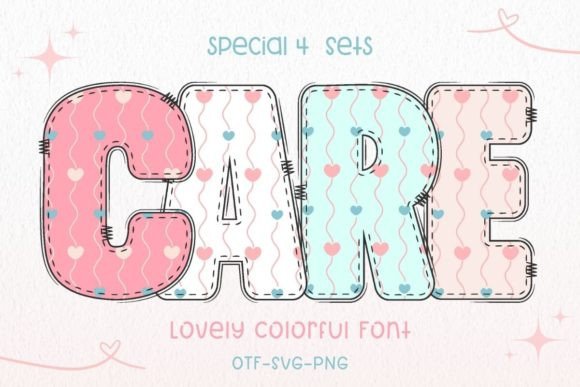
Care Font: The Perfect Addition to Your Valentine’s Day Projects
Are you looking for a beautiful and colorful font to make your Valentine’s Day projects stand out? Look no further than the Care Font! This lovely font is perfect for creating a variety of products, from banners and social media posts to mugs, cards, and shirts. In this article, we’ll take a closer look at the Care Font, its features, and how you can use it to create stunning Valentine’s Day-themed projects.
What is Care Font?
Care Font is a vibrant and colorful font designed specifically for Valentine’s Day-themed projects. It’s a versatile font that can be used to create a wide range of products, including:
📸 Preview Images

💡 Click on any image to view full size
- Banners
- Social media posts
- Mugs
- Cards
- Shirts
- Stationery
The font comes in two versions: a black version and a color version. The black version is compatible with Cricut Design Space and other cutting machines, making it perfect for crafters and DIY enthusiasts. The color version, on the other hand, is compatible with certain design programs, including PhotoShop, Illustrator, Silhouette, and Inkscape.
Font Compatibility: What You Need to Know
Before you purchase the Care Font, it’s essential to understand its compatibility with different design programs and cutting machines. Here’s a breakdown of what you need to know:
- Black Version: The black version of the Care Font is compatible with Cricut Design Space and other cutting machines. This makes it perfect for crafters and DIY enthusiasts who want to create custom projects with their cutting machines.
- Color Version: The color version of the Care Font is compatible with certain design programs, including:
- PhotoShop
- Illustrator
- Silhouette
- Inkscape
- Important Note: The OTF and/or TTF files of the color version are not compatible with Cricut Design Space. If you’re planning to use the color version with Cricut, you’ll need to use a different design program.
How to Use the Care Font: A Guide
If you’re new to using fonts or design programs, don’t worry! Our Ultimate Font Guide is here to help. This comprehensive guide covers everything you need to know about using fonts, including:
- How to install fonts on your computer
- How to use fonts in different design programs
- Tips and tricks for getting the most out of your fonts
You can find the Ultimate Font Guide on our website. This guide is packed with valuable information and tutorials to help you get started with the Care Font and other fonts.
Project Ideas Using the Care Font
The Care Font is a versatile font that can be used to create a wide range of Valentine’s Day-themed projects. Here are some ideas to get you started:
- Create a custom banner for your Valentine’s Day party
- Design a set of Valentine’s Day cards for your friends and family
- Make a custom mug with a sweet message
- Design a Valentine’s Day-themed shirt or tote bag
- Create a set of social media posts to celebrate Valentine’s Day
These are just a few ideas to get you started. With the Care Font, the possibilities are endless!
Tips and Tricks for Using the Care Font
Here are some tips and tricks to help you get the most out of the Care Font:
- Experiment with different colors and combinations to create unique projects
- Use the black version with Cricut Design Space for easy cutting
- Pair the Care Font with other fonts for a unique look
- Use the color version with design programs like PhotoShop and Illustrator for stunning results
Care Font: Access Download Now
| Font Name | Care Font |
| Author | AnningArts |
| Download | Access Download Here |
Conclusion
The Care Font is a beautiful and versatile font perfect for all your Valentine’s Day-themed projects. With its vibrant colors and compatibility with various design programs and cutting machines, it’s an excellent addition to any designer’s toolkit. Whether you’re a crafter, DIY enthusiast, or professional designer, the Care Font is sure to inspire your creativity and help you create stunning projects.
