
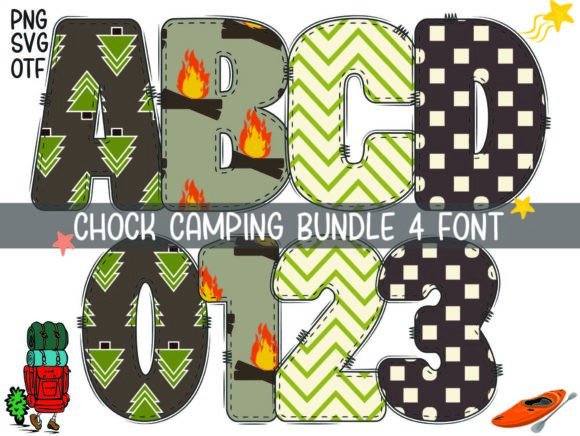
Introducing Chock Camping Font: A Cute and Colorful Addition to Your Designs
Are you looking for a font that can add a touch of playfulness and whimsy to your designs? Look no further than the Chock Camping Font. This adorable font is perfect for crafty enthusiasts, designers, and anyone looking to add a bit of fun to their creations. In this article, we’ll take a closer look at the Chock Camping Font, its features, and how you can use it to take your designs to the next level.
What is Chock Camping Font?
Chock Camping Font is a cute and colorful font that is sure to delight. Its unique and quirky design makes it perfect for a wide range of projects, from DIY crafts to professional designs. Whether you’re creating invitations, signs, or social media graphics, this font is sure to add a touch of personality to your work.
📸 Preview Images

💡 Click on any image to view full size
Key Features of Chock Camping Font
- Color Font (Opentype-SVG): Chock Camping Font is a color font, which means it can be used to create stunning designs with multiple colors. This font is perfect for those who want to add a pop of color to their designs.
- Compatibility: This font is compatible with a range of software, including PhotoShop, Illustrator, Silhouette, and Inkscape. This makes it easy to use with your favorite design tools.
- Not Compatible with Cricut: Please note that the OTF and/or TTF files of this product are not compatible with Cricut. However, you can still use this font with other software to create amazing designs.
How to Use Chock Camping Font
Using Chock Camping Font is easy. Once you’ve downloaded the font, you can install it on your computer and start using it with your favorite design software. Here are a few tips to get you started:
- Choose Your Software: Select the software you want to use with Chock Camping Font. This could be PhotoShop, Illustrator, or any other compatible software.
- Install the Font: Install the font on your computer. This will usually involve downloading the font files and then installing them on your computer.
- Select the Font: Open your design software and select Chock Camping Font from the font menu.
- Start Designing: Start creating your design using Chock Camping Font. Experiment with different colors and styles to create a unique look.
Tips and Tricks for Using Chock Camping Font
Here are a few tips and tricks to help you get the most out of Chock Camping Font:
- Experiment with Colors: One of the best things about Chock Camping Font is its ability to use multiple colors. Experiment with different color combinations to create a unique look.
- Use it with Other Fonts: Chock Camping Font can be paired with other fonts to create a stunning design. Try pairing it with a bold font for a contrasting look.
- Make it 3D: Use Chock Camping Font to create 3D designs. This can add an extra level of depth to your designs.
Ultimate Font Guide
If you’re new to using color fonts like Chock Camping Font, you may want to check out our Ultimate Font Guide. This guide provides a comprehensive overview of how to use color fonts, including how to install them, how to use them with different software, and how to troubleshoot common issues.
Chock Camping Font: Access Download Now
| Font Name | Chock Camping Font |
| Author | Font design market |
| Download | Access Download Here |
Conclusion
Chock Camping Font is a fun and playful font that can add a touch of personality to your designs. With its unique and quirky design, it’s perfect for a wide range of projects. Whether you’re a crafty enthusiast or a professional designer, this font is sure to delight. So why not give it a try and see what amazing designs you can create?
Ready to get started with Chock Camping Font? Download it now and start creating amazing designs!
