
Introducing Christmasberry Font: A Festive and Versatile Typeface for Your Designs
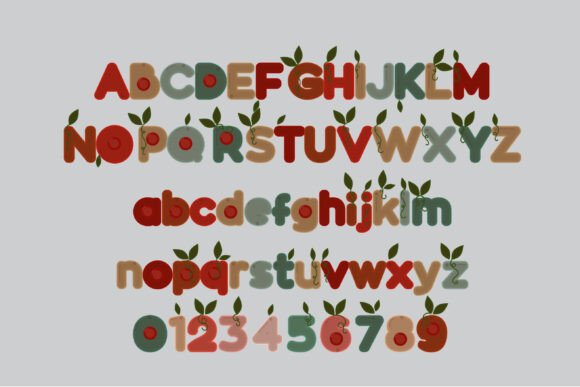
Are you looking for a unique and eye-catching font to add a touch of personality to your designs? Look no further than Christmasberry Font, a full-color typeface that features a chunky sans serif with Christmas berries and leaves throughout. In this article, we’ll take a closer look at the features and benefits of Christmasberry Font, and explore how you can use it to elevate your designs.
What is Christmasberry Font?
Christmasberry Font is a full-color font that combines a bold, sans-serif typeface with festive Christmas berries and leaves. The font is perfect for creating eye-catching titles, displays, posters, and more. With its unique and colorful design, Christmasberry Font is sure to add a touch of personality to any design.
📸 Preview Images

💡 Click on any image to view full size
Key Features of Christmasberry Font
- Chunky sans serif typeface: Christmasberry Font features a bold and chunky sans-serif typeface that’s perfect for creating eye-catching headlines and titles.
- Full-color design: The font features a full-color design with Christmas berries and leaves throughout, adding a touch of festivity and personality to your designs.
- Alt version with additional colors: An alternative version of the font is available through your system’s character map, which includes additional colors for all the letters.
- Compatible with Silhouette Studio: Christmasberry Font is compatible with Silhouette Studio, making it easy to use for crafters and designers.
How to Install and Use Christmasberry Font
Installing Christmasberry Font is easy. Simply follow these steps:
- Download the font file: Download the Christmasberry Font file from a reputable font foundry or website.
- Install the font: Install the font on your computer using FontBook for Mac users or via your preferred font manager or Control Panel in Windows.
- Access the font in your design program: Once installed, access the font in your design program, such as Adobe Illustrator or Silhouette Studio.
Note that color fonts may show as black in non-compatible programs. However, if your program supports color fonts, you’ll be able to see the font in color when you type on the document.
Programs that Support Full-Color SVG Fonts
Not all design programs support full-color SVG fonts, but many popular programs do. Some examples of programs that support full-color SVG fonts include:
- Adobe products: Adobe Illustrator, Photoshop, and InDesign all support full-color SVG fonts.
- Silhouette Studio: Silhouette Studio, a popular cutting software for crafters, supports full-color SVG fonts.
- Quark: Quark, a popular design software, supports full-color SVG fonts.
- Inkscape: Inkscape, a free and open-source design software, supports full-color SVG fonts.
Benefits of Using Full-Color SVG Fonts
Full-color SVG fonts, like Christmasberry Font, offer a range of benefits for designers. Some of the benefits include:
- Scalability: SVG fonts are vector-based, which means they can be scaled to any size without losing quality.
- Flexibility: Full-color SVG fonts can be used in a wide range of designs, from simple text logos to complex illustrations.
- Personality: Full-color SVG fonts add a touch of personality to your designs, making them more eye-catching and engaging.
Tips for Using Christmasberry Font
Here are some tips for using Christmasberry Font in your designs:
- Use it for titles and headlines: Christmasberry Font is perfect for creating eye-catching titles and headlines.
- Experiment with different colors: Try experimenting with different colors and combinations to create unique and eye-catching designs.
- Pair it with other fonts: Christmasberry Font can be paired with other fonts to create interesting and dynamic designs.
Christmasberry Font: Access Download Now
| Font Name | Christmasberry Font |
| Author | Illustration Ink |
| Download | Access Download Here |
Conclusion
Christmasberry Font is a unique and versatile typeface that’s perfect for adding a touch of personality to your designs. With its full-color design, chunky sans-serif typeface, and compatibility with popular design programs, Christmasberry Font is a great choice for designers and crafters alike. Whether you’re creating titles, displays, posters, or more, Christmasberry Font is sure to make your designs stand out.
FAQs
- What is Christmasberry Font?
- Christmasberry Font is a full-color font that features a chunky sans serif with Christmas berries and leaves throughout.
- Is Christmasberry Font compatible with my design program?
- Christmasberry Font is compatible with many popular design programs, including Adobe products, Silhouette Studio, Quark, and Inkscape.
- Can I use Christmasberry Font for commercial projects?
- Yes, Christmasberry Font can be used for commercial projects. However, be sure to check the licensing terms and conditions to ensure you’re allowed to use the font for commercial use.
