
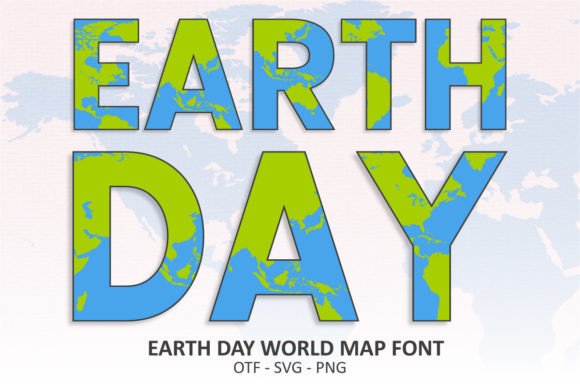
Introducing the Earth Day World Map Font: Elevate Your Eco-Friendly Designs
As we approach Earth Day, it’s time to get creative with your eco-friendly designs. Whether you’re a designer, a DIY enthusiast, or a social media influencer, you need a font that speaks to the theme of the day. That’s where the Earth Day World Map Font comes in – a stunning color font featuring intricate world map patterns that’s perfect for all your Earth Day-themed projects.
What is the Earth Day World Map Font?
The Earth Day World Map Font is a unique and captivating font designed specifically for Earth Day-themed projects. This font features intricate world map patterns that will add a touch of elegance and sophistication to your designs. The font is available in both color and black versions, making it versatile for various design applications.
Key Features of the Earth Day World Map Font
- Intricate world map patterns: The font features detailed world map patterns that will add a touch of eco-friendliness to your designs.
- Color and black versions: The font is available in both color and black versions, making it suitable for various design applications.
- Compatible with popular design programs: The color version of the font is compatible with design programs such as PhotoShop, Illustrator, Silhouette, and Inkscape.
- Cricut compatible: The black version of the font is compatible with Cricut Design Space and other cutting machines.
Uses of the Earth Day World Map Font
The Earth Day World Map Font is perfect for a wide range of design projects, including:
- Banners: Create eye-catching banners for Earth Day events, promotions, or social media campaigns.
- Social media posts: Add a touch of eco-friendliness to your social media posts with this unique font.
- Mugs: Design eco-friendly mugs for Earth Day promotions or gifts.
- Cards: Create beautiful Earth Day-themed cards for friends, family, or clients.
- Shirts: Design eco-friendly shirts for Earth Day events or promotions.
- Stationery: Add a touch of elegance to your Earth Day-themed stationery.
How to Use the Earth Day World Map Font
Using the Earth Day World Map Font is easy. Here’s a step-by-step guide:
- Download the font: Download the font from our website.
- Install the font: Install the font on your computer or device.
- Choose your design program: Choose your preferred design program, such as PhotoShop, Illustrator, or Cricut Design Space.
- Select the font: Select the Earth Day World Map Font from your font library.
- Design your project: Design your project using the font.
Tips and Tricks
Here are some tips and tricks to help you get the most out of the Earth Day World Map Font:
- Experiment with colors: Experiment with different colors to match your brand or design theme.
- Combine with other fonts: Combine the Earth Day World Map Font with other fonts to create a unique design.
- Use in combination with images: Use the font in combination with images to create a visually appealing design.
Troubleshooting
If you encounter any issues with the Earth Day World Map Font, here are some troubleshooting tips:
- Font not displaying correctly: Check that the font is installed correctly and that you’re using the correct font file.
- Font not compatible with design program: Check that your design program is compatible with the font.
Earth Day World Map Font: Access Download Now
| Font Name | Earth Day World Map Font |
| Author | Font Craft Studio |
| Download | Access Download Here |
Conclusion
The Earth Day World Map Font is a unique and captivating font that’s perfect for all your Earth Day-themed projects. With its intricate world map patterns and compatibility with popular design programs, this font is sure to elevate your eco-friendly designs. Download the font today and get creative with your Earth Day designs!
Ultimate Font Guide
For more information on how to use the Earth Day World Map Font, check out our Ultimate Font Guide. This comprehensive guide covers everything you need to know about using our fonts, including:
- Font installation: How to install our fonts on your computer or device.
- Font compatibility: Which design programs are compatible with our fonts.
- Design tips: Tips and tricks for getting the most out of our fonts.
