
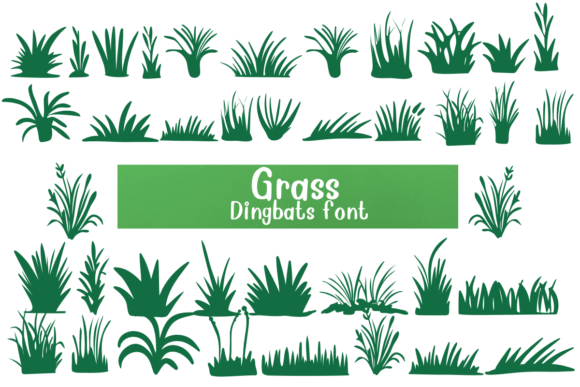
Grass Font: A Fun and Decorative Way to Add a Natural Touch
The Grass Font is a unique and creative dingbat font that uses small pictures of grass instead of regular letters or numbers. When you type with this font, you’ll see different shapes and styles of grass instead of standard text. It’s a fun and decorative way to add a natural, green look to your projects.
What is a Dingbat Font?
A dingbat font is a type of font that uses symbols or images instead of letters or numbers. Dingbat fonts are often used for decorative purposes, such as adding a touch of personality to a design or creating a unique visual effect. The Grass Font is a type of dingbat font that uses grass images to create a natural and earthy look.
Features of the Grass Font
The Grass Font has several features that make it a fun and decorative way to add a natural touch to your projects. Some of its key features include:
- Unique grass images: The Grass Font uses a variety of grass images, including different shapes, styles, and sizes.
- Natural look: The font has a natural, earthy look that can add a touch of personality to your designs.
- Fun and decorative: The Grass Font is perfect for creating fun and decorative designs, such as garden-themed projects or eco-friendly posters.
- Easy to use: The font is easy to use and can be installed on your computer like any other font.
Uses of the Grass Font
The Grass Font can be used for a variety of purposes, including:
- Garden-themed projects: The font is perfect for creating garden-themed projects, such as posters, flyers, or brochures.
- Eco-friendly designs: The font can be used to create eco-friendly designs, such as posters or social media graphics, that promote environmental awareness.
- Wedding and event designs: The font can be used to create unique and personalized wedding and event designs, such as invitations or decorations.
- Children’s projects: The font is perfect for creating fun and educational projects for children, such as coloring books or activity sheets.
Benefits of Using the Grass Font
There are several benefits to using the Grass Font, including:
- Unique look: The font provides a unique and eye-catching look that can help your designs stand out.
- Easy to use: The font is easy to use and can be installed on your computer like any other font.
- Fun and creative: The font is perfect for creating fun and creative designs that can add a touch of personality to your projects.
- Customizable: The font can be customized to fit your design needs, such as changing the color or size.
How to Use the Grass Font
Using the Grass Font is easy and straightforward. Here are the steps to follow:
- Download the font: Download the Grass Font from a reputable font website or designer.
- Install the font: Install the font on your computer like any other font.
- Choose the font: Choose the Grass Font from your font list in your design software.
- Type with the font: Type with the font to see the grass images appear.
Tips and Tricks for Using the Grass Font
Here are some tips and tricks for using the Grass Font:
- Use it sparingly: Use the font sparingly to add a touch of personality to your designs.
- Experiment with colors: Experiment with different colors to find the perfect shade of green for your design.
- Combine with other fonts: Combine the Grass Font with other fonts to create a unique and eye-catching look.
- Use it for headings: Use the font for headings or titles to add a touch of personality to your designs.
Grass Font: Access Download Now
| Font Name | Grass Font |
| Author | Unknown |
| Download | Access Download Here |
Conclusion
The Grass Font is a fun and decorative way to add a natural touch to your projects. With its unique grass images and easy-to-use design, it’s perfect for creating garden-themed projects, eco-friendly designs, and more. Whether you’re a designer, artist, or DIY enthusiast, the Grass Font is a great addition to your font collection.
FAQs
- Q: What is the Grass Font?
A: The Grass Font is a dingbat font that uses small pictures of grass instead of regular letters or numbers. - Q: How do I use the Grass Font?
A: Simply download and install the font, then choose it from your font list in your design software. - Q: Can I customize the Grass Font?
A: Yes, you can customize the font to fit your design needs, such as changing the color or size.
