
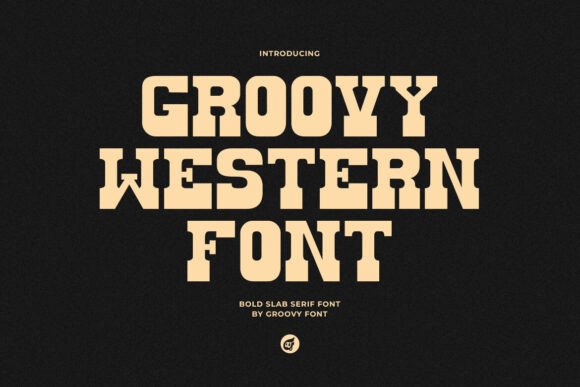
Groovy Western Font: A Bold Slab Serif Font with a Vintage Twist
The world of typography is vast and diverse, with a multitude of fonts to choose from, each with its unique characteristics and uses. One font that has gained significant attention in recent times is the Groovy Western font, a bold slab serif font that combines elements of vintage typewriting with a modern Western twist. In this article, we’ll take a closer look at the Groovy Western font, its features, and how it can be used to add a touch of ruggedness and sophistication to your designs.
Key Features of Groovy Western Font
- Bold Slab Serif: Groovy Western is a bold slab serif font, characterized by its strong, thick lines and sturdy serifs. This gives it a bold presence, making it perfect for designs that require a statement piece.
- Vintage Typewriting Elements: The font combines elements of vintage typewriting, giving it a retro charm that’s hard to ignore.
- Modern Western Twist: Groovy Western also has a modern Western twist, making it a unique and refreshing take on traditional slab serif fonts.
Ideas for Using Groovy Western Font
Groovy Western is a versatile font that can be used in a variety of design projects. Here are some ideas to get you started:
- Headlines: Use Groovy Western as a headline font to grab attention and make a statement. Its bold presence is sure to draw the eye and add emphasis to your message.
- Logos: Groovy Western is a great choice for logos, particularly for brands that want to convey a sense of ruggedness and sophistication.
- Branding: Use Groovy Western as part of your brand identity to add a touch of retro charm and Western flair.
- Posters: Groovy Western is perfect for posters, flyers, and other promotional materials where you want to make a bold statement.
Typography Tips for Using Groovy Western Font
When using Groovy Western, there are a few typography tips to keep in mind to get the most out of the font:
- Pair with a sans-serif font: Pair Groovy Western with a sans-serif font to create contrast and add visual interest to your design.
- Use it sparingly: While Groovy Western is a bold font, it’s best used sparingly to avoid overwhelming the reader.
- Experiment with colors: Groovy Western looks great in a variety of colors, so don’t be afraid to experiment and find the perfect hue for your design.
Font Pairing Ideas for Groovy Western
Font pairing is an art, and Groovy Western can be paired with a variety of fonts to create a unique and harmonious design. Here are some font pairing ideas to get you started:
- Open Sans: Pair Groovy Western with Open Sans, a clean and modern sans-serif font, to create a bold and contrasting design.
- Lato: Lato, a sleek and modern sans-serif font, pairs well with Groovy Western, adding a touch of sophistication to your design.
- Merriweather: For a more vintage look, pair Groovy Western with Merriweather, a classic serif font.
Design Inspiration: Examples of Groovy Western in Use
Groovy Western is a versatile font that can be used in a variety of design projects. Here are some examples of how it can be used:


Downloading and Licensing Groovy Western Font
Groovy Western is a commercial font that can be downloaded and licensed for use in your design projects. Here are some details on how to download and license the font:
- Font foundries: Groovy Western can be found on popular font foundries such as Font Bundles, Creative Market, and MyFonts.
- License terms: Be sure to check the license terms for Groovy Western, as they may vary depending on the foundry and the specific license.
Groovy Western Font: Access Download Now
| Font Name | Groovy Western Font |
| Author | Unknown |
| Download | Access Download Here |
Conclusion
Groovy Western is a bold and unique font that’s perfect for designs that require a touch of ruggedness and sophistication. Its strong, thick lines and sturdy serifs give it a bold presence, making it a great choice for headlines, logos, and branding. With its vintage typewriting elements and modern Western twist, Groovy Western is sure to add a touch of retro charm to your designs.
