
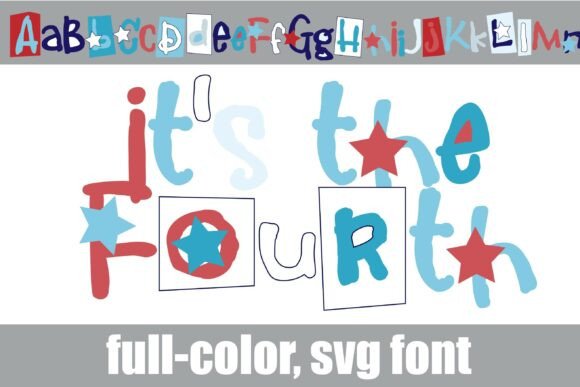
Introducing It’s the Fourth Font: A Vibrant and Youthful Full-Color Font
In the world of typography, fonts play a crucial role in conveying messages, expressing emotions, and adding personality to designs. With the rise of digital creativity, font technology has evolved to offer a wide range of styles, colors, and effects. One such innovative font is “It’s the Fourth Font,” a full-color font that features a youthful and vibrant style in Americana colors with occasional stars. In this article, we’ll explore the unique features of this font, its benefits, and how to use it in your designs.
Key Features of It’s the Fourth Font
- Full-color font: This font features a range of colors that can add a touch of personality to your designs.
- Youthful and vibrant style: The font’s style is perfect for designs that require a playful and energetic feel.
- Americana colors: The font features a palette of colors reminiscent of American culture.
- Occasional stars: The font includes occasional stars that add a whimsical touch to your designs.
- Alt case of alternate colorings: Each letter has an alternate coloring that can be accessed through your system or Silhouette’s glyph map.
Installing It’s the Fourth Font
Installing It’s the Fourth Font is a straightforward process. Here’s a step-by-step guide:
📸 Preview Images

💡 Click on any image to view full size
- Mac users: Install the font via FontBook.
- Windows users: Install the font via your preferred font manager or Control Panel.
Once installed, you can access the font in your design software. However, please note that color fonts may show as black in non-compatible programs.
Program Compatibility
It’s the Fourth Font is compatible with various design programs that support full-color SVG fonts. Some of the compatible programs include:
- Adobe products: Adobe software, such as Illustrator and Photoshop, supports full-color SVG fonts.
- Silhouette Studio: This software supports full-color SVG fonts, allowing you to access the font’s alternate colorings.
- Quark: Quark design software supports full-color SVG fonts.
- Inkscape: This popular vector graphics editor supports full-color SVG fonts.
To check if your program supports color fonts, simply type on the document and see if the font appears in color. If it shows as black, it’s likely that your program doesn’t support color fonts.
Benefits of Using Full-Color SVG Fonts
Full-color SVG fonts, like It’s the Fourth Font, offer several benefits, including:
- Personality and flair: Add a touch of personality to your designs with vibrant colors and unique styles.
- Scalability: SVG fonts are vector-based, making them scalable to any size without losing quality.
- Flexibility: With a range of colors and styles to choose from, you can create anything from simple text logos to complex illustrations.
Design Tips Using It’s the Fourth Font
Here are some design tips to help you get the most out of It’s the Fourth Font:
- Experiment with colors: Try out different color combinations to create unique and eye-catching designs.
- Play with size: SVG fonts can be scaled to any size without losing quality, so experiment with different font sizes to create visual interest.
- Mix and match: Combine It’s the Fourth Font with other fonts and design elements to create complex and visually appealing designs.
It’s the Fourth Font: Access Download Now
| Font Name | It’s the Fourth Font |
| Author | Illustration Ink |
| Download | Access Download Here |
Conclusion
It’s the Fourth Font is a vibrant and youthful full-color font that can add a touch of personality to your designs. With its Americana colors, occasional stars, and alternate colorings, this font is perfect for designs that require a playful and energetic feel. By understanding how to install, use, and benefit from this font, you can take your designs to the next level. So, get creative and make it your fourth font of choice!
