
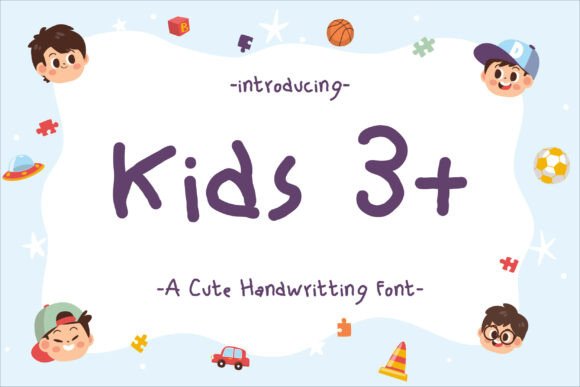
Kids 3+ Font: The Perfect Choice for Designs that Require a Childlike Touch
When it comes to creating designs that require a childlike touch, the right font can make all the difference. Kids 3+ font is a simple children’s handwriting font that has become a popular choice among designers and crafters. Its versatility and charm make it ideal for a wide range of projects, from book covers and social media posts to logos, branding, digital planners, birthday invitations, greeting cards, photo albums, and more.
What is Kids 3+ Font?
Kids 3+ font is a handwriting font designed to mimic the writing style of children aged 3 and above. It’s a simple, yet charming font that captures the innocence and playfulness of children’s handwriting. The font is easy to read and has a friendly tone, making it perfect for designs that require a personal touch.
📸 Preview Images


💡 Click on any image to view full size
Characteristics of Kids 3+ Font
Kids 3+ font has several characteristics that make it a popular choice among designers. Some of its key features include:
- Childlike handwriting style: The font has a playful, handwritten style that’s reminiscent of children’s writing.
- Easy to read: The font is clear and easy to read, making it perfect for designs that require a lot of text.
- Versatile: Kids 3+ font can be used for a wide range of projects, from formal to informal designs.
- Simple and charming: The font has a simple, yet charming quality that makes it perfect for designs that require a childlike touch.
Uses of Kids 3+ Font
Kids 3+ font is a versatile font that can be used for a wide range of projects. Some of the most popular uses of the font include:
- Book covers: Kids 3+ font is perfect for book covers that require a childlike touch. It’s especially popular for children’s books, educational resources, and activity books.
- Social media posts: The font is great for social media posts that require a playful, engaging tone. It’s perfect for creating fun and interactive content that appeals to children and adults alike.
- Logos and branding: Kids 3+ font can be used to create logos and branding materials that require a childlike touch. It’s perfect for businesses that cater to children, such as children’s clothing stores, toy stores, and kids’ restaurants.
- Digital planners: The font is great for digital planners that require a playful, engaging tone. It’s perfect for creating fun and interactive planners that appeal to children and adults alike.
- Birthday invitations: Kids 3+ font is perfect for birthday invitations that require a childlike touch. It’s especially popular for children’s birthday parties, baby showers, and other celebrations.
- Greeting cards: The font is great for greeting cards that require a playful, engaging tone. It’s perfect for creating fun and interactive cards that appeal to children and adults alike.
- Photo albums: Kids 3+ font can be used to create photo albums that require a childlike touch. It’s perfect for creating fun and interactive albums that showcase special moments and memories.
Benefits of Using Kids 3+ Font
There are several benefits to using Kids 3+ font for your designs. Some of the most significant advantages include:
- Unique and playful tone: Kids 3+ font has a unique and playful tone that sets it apart from other fonts. It’s perfect for designs that require a childlike touch.
- Easy to read: The font is clear and easy to read, making it perfect for designs that require a lot of text.
- Versatile: Kids 3+ font can be used for a wide range of projects, from formal to informal designs.
- Time-saving: Using a pre-designed font like Kids 3+ font can save you time and effort. You don’t have to spend hours designing a font from scratch.
- Cost-effective: Kids 3+ font is a cost-effective solution for designers and crafters. It’s a one-time purchase that can be used for multiple projects.
How to Use Kids 3+ Font
Using Kids 3+ font is easy. Here are the steps to follow:
- Download the font: The first step is to download the Kids 3+ font file. You can purchase the font from a reputable font foundry or a design website.
- Install the font: Once you’ve downloaded the font file, install it on your computer. The installation process may vary depending on your operating system.
- Choose the font: Open your design software and choose the Kids 3+ font from the font menu.
- Type your text: Type your text using the Kids 3+ font. You can adjust the font size, color, and style to suit your design.
- Save and export: Save your design and export it in the desired format.
Tips for Using Kids 3+ Font
Here are some tips for using Kids 3+ font:
- Use it for child-related designs: Kids 3+ font is perfect for designs that require a childlike touch. Use it for child-related designs, such as children’s books, toys, and kids’ clothing.
- Experiment with font sizes: Kids 3+ font looks great in different font sizes. Experiment with different font sizes to find the one that works best for your design.
- Combine it with other fonts: Kids 3+ font can be combined with other fonts to create a unique and playful tone. Experiment with different font combinations to find the one that works best for your design.
- Use it for digital designs: Kids 3+ font is perfect for digital designs, such as social media posts, digital planners, and e-books.
Kids 3+ Font: Access Download Now
| Font Name | Kids 3+ Font |
| Author | Unknown |
| Download | Access Download Here |
Conclusion
Kids 3+ font is a simple children’s handwriting font that’s perfect for designs that require a childlike touch. Its versatility, charm, and ease of use make it a popular choice among designers and crafters. With its wide range of uses, benefits, and tips for use, Kids 3+ font is a great addition to any designer’s font collection.
