
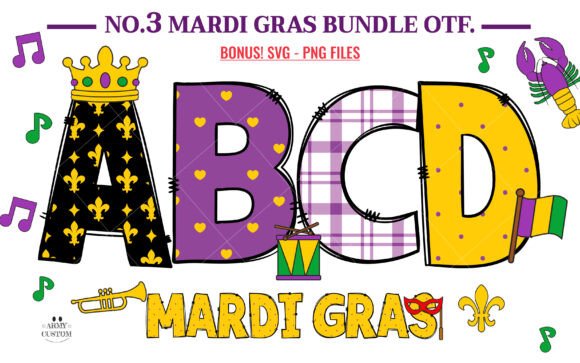
Mardi Gras Font: Dive into the Spirit of Carnival with Vibrant Letter Designs
The Mardi Gras Font is a festive and decorative font bundle that captures the essence of the Mardi Gras tradition. This font bundle, also known as “Mardi Gras Font Bundle No.3,” is designed to immerse you in the rich cultural hues of Mardi Gras with its vivid and colorful letter designs. In this article, we’ll explore the features of this font bundle, its compatibility with various design programs, and how to use it to create stunning Mardi Gras-inspired designs.
The Inspiration Behind Mardi Gras Font
Mardi Gras, which is French for “Fat Tuesday,” is a carnival celebration that takes place before the Christian season of Lent. The tradition is known for its vibrant colors, lively music, and festive atmosphere. The Mardi Gras Font is inspired by the rich cultural heritage of this celebration, with its bold and colorful letter designs that evoke the spirit of carnival.
📸 Preview Images

💡 Click on any image to view full size
Features of Mardi Gras Font Bundle
The Mardi Gras Font bundle is a collection of decorative letters, carefully colored in vibrant shades of royal purple, fresh green, and radiant gold. The font features traditional Mardi Gras patterns, including:
- Bubbly polka dots
- Chic chevron stripes
- Emblematic fleur-de-lis embellishments
Each alphabet is carefully designed to resonate with Mardi Gras-induced joy, incorporating delightful accents such as:
- Dazzling beads
- Regal crowns
- Melodic musical notes
- Jubilant trumpet
Color Version vs. Black Version
The Mardi Gras Font bundle comes in two versions: a color version and a black version. The color version features vibrant colors and is compatible with certain design programs, including:
- PhotoShop
- Illustrator
- Silhouette
- Inkscape
The black version, on the other hand, is compatible with Cricut Design Space and other cutting machines. Note that the color version is not compatible with Cricut, and the OTF and/or TTF files of the color version are not compatible with Cricut.
Using Mardi Gras Font with Design Programs
To use the Mardi Gras Font with design programs, you’ll need to understand the compatibility of the font with different software. Here’s a brief guide on how to use the font with popular design programs:
PhotoShop
To use the Mardi Gras Font with PhotoShop, simply download the font files and install them on your computer. Open PhotoShop and select the font from the font menu. You can then use the font to create stunning Mardi Gras-inspired designs.
Illustrator
To use the Mardi Gras Font with Illustrator, follow the same steps as with PhotoShop. Install the font files on your computer, open Illustrator, and select the font from the font menu.
Cricut Design Space
To use the black version of the Mardi Gras Font with Cricut Design Space, simply upload the font files to Cricut Design Space and select the font from the font menu. Note that the color version is not compatible with Cricut.
Tips and Tricks for Using Mardi Gras Font
Here are some tips and tricks for using the Mardi Gras Font to create stunning designs:
- Experiment with different font sizes and colors to create a unique look.
- Use the font to create Mardi Gras-inspired quotes, phrases, and slogans.
- Combine the font with other design elements, such as images and graphics, to create stunning designs.
- Use the font to create custom signs, banners, and decorations for Mardi Gras celebrations.
Mardi Gras Font: Access Download Now
| Font Name | Mardi Gras Font |
| Author | Army Custom |
| Download | Access Download Here |
Conclusion
The Mardi Gras Font bundle is a vibrant and decorative font bundle that captures the essence of the Mardi Gras tradition. With its bold and colorful letter designs, this font is perfect for creating stunning Mardi Gras-inspired designs. Whether you’re a designer, a crafty person, or simply someone who loves Mardi Gras, this font bundle is a must-have. So, dive into the spirit of carnival with this amazing font bundle and create your own Mardi Gras-inspired masterpieces!
Ultimate Font Guide
For more information on how to use this type of font, please check our Ultimate Font Guide.
