
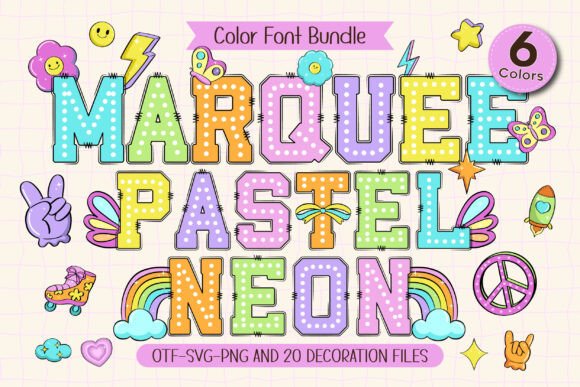
Marquee Pastel Neon Font: A Fun and Vibrant Color Font for Kids’ Projects and More
Are you looking for a font that can add a pop of brightness and joy to your kids’ projects, school activity posters, classroom signs, and party decorations? Look no further than the Marquee Pastel Neon Font! This fun and vibrant color font combines the classic marquee style with bright, glowing neon pastel colors to create a cute, playful, and kid-friendly design.
Key Features of Marquee Pastel Neon Font
- 6 Colorful Font Variations: The Marquee Pastel Neon Font comes in 6 different colorful variations, each with its own unique and playful design.
- 20 Matching Doodle Cliparts: The font set also includes 20 matching doodle cliparts that can be used to add an extra touch of fun and personality to your designs.
- Black Version Compatible with Cricut: The black version of the font is compatible with Cricut Design Space and other cutting machines, making it perfect for DIY crafts and projects.
- Color Version Compatible with Design Programs: The color version of the font is compatible with design programs such as PhotoShop, Illustrator, Silhouette, and Inkscape.
Endless Usage Ideas for Marquee Pastel Neon Font
The Marquee Pastel Neon Font is perfect for a wide range of projects, including:
- Kids’ Projects: Use the font to create fun and colorful projects for kids, such as school activity posters, classroom signs, and important day cards.
- Party Decorations: Add a pop of brightness and joy to your party decorations with the Marquee Pastel Neon Font.
- T-Shirts and Bag Designs: Use the font to create fun and colorful designs for t-shirts and bags.
- Water Bottles and DIY Crafts: The font is also perfect for creating custom designs for water bottles and DIY crafts.
How to Use Marquee Pastel Neon Font: A Guide
To get the most out of the Marquee Pastel Neon Font, be sure to check out our Ultimate Font Guide. This guide provides detailed instructions on how to use the font with different design programs, including:
- PhotoShop: Learn how to use the font with PhotoShop to create stunning designs.
- Illustrator: Discover how to use the font with Illustrator to create vector graphics.
- Silhouette: Find out how to use the font with Silhouette to create custom designs.
- Inkscape: Learn how to use the font with Inkscape to create scalable vector graphics.
Compatibility and Limitations
Note that the color version of the Marquee Pastel Neon Font is not compatible with Cricut Design Space and other cutting machines. However, the black version of the font is compatible with these machines.
Also, be aware that the OTF and/or TTF files of the color version are not compatible with Cricut. If you’re using Cricut, be sure to use the black version of the font.
Tips and Tricks for Using Marquee Pastel Neon Font
Here are some tips and tricks for getting the most out of the Marquee Pastel Neon Font:
- Experiment with Different Colors: Try out different color combinations to create unique and eye-catching designs.
- Use with Doodle Cliparts: Use the font with the matching doodle cliparts to add an extra touch of fun and personality to your designs.
- Mix and Match Fonts: Experiment with mixing and matching the Marquee Pastel Neon Font with other fonts to create interesting and dynamic designs.
Marquee Pastel Neon Font: Access Download Now
| Font Name | Marquee Pastel Neon Font |
| Author | Issie_Studio |
| Download | Access Download Here |
Conclusion
The Marquee Pastel Neon Font is a fun and vibrant color font that is perfect for kids’ projects, school activity posters, classroom signs, and party decorations. With its 6 colorful font variations and 20 matching doodle cliparts, this font set is sure to add a pop of brightness and joy to every creation.
Whether you’re a teacher, parent, or designer, the Marquee Pastel Neon Font is a great addition to your font collection. So why wait? Download the Marquee Pastel Neon Font today and start creating fun and colorful designs!
