
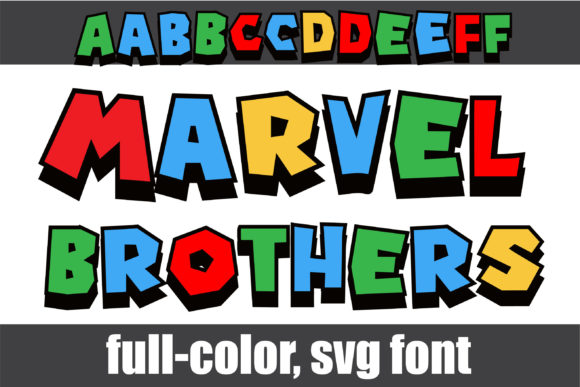
Marvel Brothers Font: A Fun and Colorful Font for Your Creative Projects
If you’re a fan of bold, colorful, and playful typography, then the Marvel Brothers Font is a great addition to your font collection. This full-color font features blocky, primary-colored lettering with black shadows, making it perfect for a variety of creative projects, from DIY crafts to digital designs. In this article, we’ll take a closer look at the Marvel Brothers Font, its features, and how to use it in your projects.
What is Marvel Brothers Font?
The Marvel Brothers Font is a unique and fun font that features blocky, primary-colored lettering with black shadows. The font is designed to be eye-catching and playful, making it perfect for projects that require a bold and colorful touch. The font comes with a second upper and lower alt case that you can access through your system’s character map, offering more flexibility and creativity in your designs.
Key Features of Marvel Brothers Font
- Full-color font: The Marvel Brothers Font is a color font (Opentype-SVG) that features blocky, primary-colored lettering with black shadows.
- Blocky lettering: The font features blocky lettering that is perfect for creating bold and playful designs.
- Second upper and lower alt case: The font comes with a second upper and lower alt case that you can access through your system’s character map.
- Compatible with popular design software: The font is compatible with PhotoShop, Illustrator, Silhouette, and Inkscape.
Technical Details and Compatibility
The Marvel Brothers Font is a color font (Opentype-SVG) that is compatible with popular design software such as PhotoShop, Illustrator, Silhouette, and Inkscape. However, the OTF and/or TTF files of this product are not compatible with Cricut. If you’re planning to use this font with Cricut, you’ll need to explore alternative options or conversion methods.
| Software | Compatibility |
|---|---|
| PhotoShop | Compatible |
| Illustrator | Compatible |
| Silhouette | Compatible |
| Inkscape | Compatible |
| Cricut | Not Compatible |
How to Use Marvel Brothers Font in Your Projects
Using the Marvel Brothers Font in your projects is easy. Here’s a step-by-step guide to get you started:
- Download and install the font: Download the Marvel Brothers Font from a reputable font source and install it on your computer.
- Open your design software: Open your design software, such as PhotoShop or Illustrator.
- Select the font: Select the Marvel Brothers Font from your font list.
- Access the second upper and lower alt case: Access the second upper and lower alt case through your system’s character map.
- Start designing: Start designing your project using the Marvel Brothers Font.
Tips and Tricks for Using Marvel Brothers Font
Here are some tips and tricks for using the Marvel Brothers Font in your projects:
- Use it for bold and playful designs: The Marvel Brothers Font is perfect for creating bold and playful designs, such as posters, flyers, and brochures.
- Experiment with different colors: The font features blocky, primary-colored lettering with black shadows, but you can experiment with different colors to create unique designs.
- Pair it with other fonts: The Marvel Brothers Font can be paired with other fonts to create interesting and creative designs.
Marvel Brothers Font: Access Download Now
| Font Name | Marvel Brothers Font |
| Author | Illustration Ink |
| Download | Access Download Here |
Conclusion
The Marvel Brothers Font is a fun and colorful font that can add a bold and playful touch to your creative projects. With its blocky, primary-colored lettering and black shadows, it’s perfect for a variety of designs, from DIY crafts to digital designs. By following the tips and tricks outlined in this article, you can get the most out of this unique and creative font.
Additional Resources
- Ultimate Font Guide: Check out our Ultimate Font Guide for more information on how to use color fonts like Marvel Brothers Font.
- Font tutorials: Check out our font tutorials for more tips and tricks on using Marvel Brothers Font and other fonts in your designs.
