
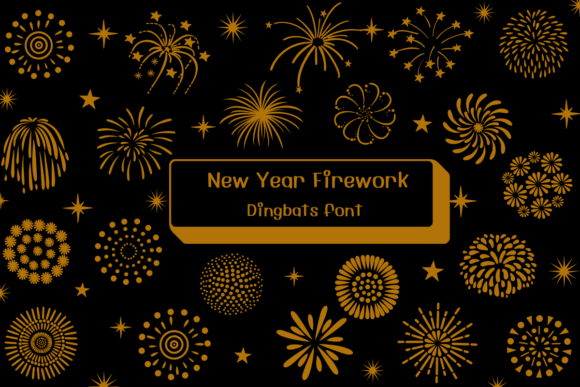
New Year Firework Font: Add a Burst of Celebration to Your Designs
As the clock strikes midnight on New Year’s Eve, fireworks light up the sky, symbolizing a fresh start and a year full of possibilities. What better way to capture the essence of this festive occasion than with a font that’s as vibrant and playful as the fireworks themselves? Introducing the “New Year Firework” font, a fun dingbat font that brings the magic of fireworks to your digital designs.
What is the New Year Firework Font?
The “New Year Firework” font is a unique and creative typeface that features playful fireworks designs. Each letter or symbol in this font is carefully crafted to resemble a firework, complete with intricate details and colorful bursts. This font is perfect for anyone looking to add a touch of celebration and festivity to their party invitations, holiday cards, or other creative projects.
📸 Preview Images


💡 Click on any image to view full size
Key Features of the New Year Firework Font
- Unique Firework Designs: Each letter or symbol in the font features a distinct firework design, ensuring that your text stands out and adds a pop of color to your designs.
- Playful and Festive: The font’s playful and festive vibe makes it perfect for New Year’s Eve celebrations, birthday parties, and other joyful occasions.
- Easily Customizable: The font is easy to use and customize, allowing you to adjust the size, color, and style to fit your design needs.
- Dingbat Font: As a dingbat font, “New Year Firework” offers a wide range of symbols and characters that can be used to create eye-catching text and designs.
Uses for the New Year Firework Font
The “New Year Firework” font is incredibly versatile and can be used in a variety of creative projects, including:
- Party Invitations: Add a burst of celebration to your party invitations with this fun and festive font.
- Holiday Cards: Create eye-catching holiday cards that are sure to impress your friends and family.
- Festive Projects: Use the font to create festive projects, such as social media graphics, blog posts, and website headers.
- Birthday Cards: Make your birthday cards stand out with this playful and celebratory font.
How to Use the New Year Firework Font
Using the “New Year Firework” font is easy and straightforward. Here are the steps to get started:
- Download the Font: Download the font file from a reputable font website or market.
- Install the Font: Install the font on your computer or device.
- Choose a Design Program: Open your preferred design program, such as Adobe Illustrator or Canva.
- Select the Font: Select the “New Year Firework” font from your font library.
- Customize the Font: Adjust the size, color, and style to fit your design needs.
- Create Your Design: Start creating your design using the font.
Tips and Tricks for Using the New Year Firework Font
Here are some tips and tricks to help you get the most out of the “New Year Firework” font:
- Experiment with Colors: Try out different colors and color combinations to create unique and eye-catching designs.
- Mix and Match: Mix and match different font sizes and styles to create visual interest.
- Add Texture: Add texture to your design by using the font in combination with other design elements, such as patterns or images.
- Keep it Simple: Don’t be afraid to keep your design simple and clean, allowing the font to be the focal point.
New Year Firework Font: Access Download Now
| Font Name | New Year Firework Font |
| Author | Unknown |
| Download | Access Download Here |
Conclusion
The “New Year Firework” font is a fun and creative way to add a burst of celebration to your designs. With its unique firework designs, playful and festive vibe, and ease of use, this font is perfect for anyone looking to create eye-catching party invitations, holiday cards, or festive projects. So why not give it a try and add some sparkle to your designs?
FAQs
- Q: What type of font is the New Year Firework font?
A: The New Year Firework font is a dingbat font featuring playful fireworks designs. - Q: Can I use the New Year Firework font for commercial projects?
A: Yes, the font can be used for commercial projects, such as creating party invitations, holiday cards, or festive projects. - Q: How do I install the New Year Firework font on my computer?
A: Simply download the font file and follow the installation instructions for your operating system. - Q: Can I customize the New Year Firework font?
A: Yes, you can adjust the size, color, and style of the font to fit your design needs.
