
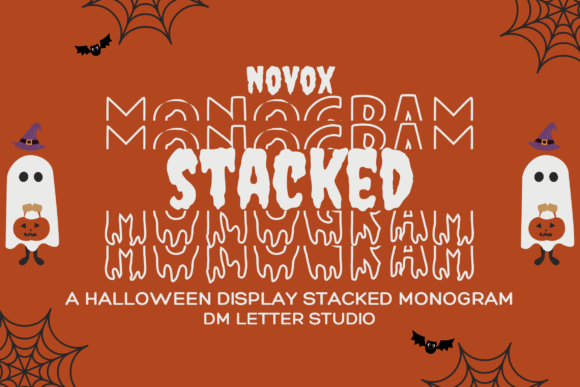
Novox Ghost Stacked Monogram Font: A Spooky Layered Letter Font for Halloween Enthusiasts
The Novox Ghost Stacked Monogram Font is a unique and captivating font that brings an eerie twist to traditional monograms. With its bold, layered letters and spectral flair, this font is perfect for those who love spooky aesthetics with a structured, symmetrical style. In this article, we will explore the features and benefits of the Novox Ghost Stacked Monogram Font, and how it can be used to create spooky and fun designs for Halloween crafts, haunted house décor, creepy mugs, or ghost-themed monogrammed gifts.
What is Novox Ghost Stacked Monogram Font?
The Novox Ghost Stacked Monogram Font is a digital font that features layered, ghostly letters arranged vertically for a dramatic and haunting visual effect. The font is designed to give each letter combination a unique, blocky presence that still feels ghostly and fun. The stacked format of the font makes it perfect for creating monograms, logos, and other designs that require a bold and eye-catching aesthetic.
📸 Preview Images


💡 Click on any image to view full size
Features of Novox Ghost Stacked Monogram Font
- Spooky Stacked Monogram Style: The font features layered ghostly letters arranged vertically for a dramatic and haunting visual effect.
- Ideal for Monogram Crafts: The font is perfect for customizing tumblers, shirts, tote bags, or digital Halloween tags.
- Bold & Chilling Aesthetic: The font has a strong yet spectral aesthetic that is great for grabbing attention without losing the spooky vibe.
- Layer-Friendly Format: The font is optimized for Cricut, Silhouette, Glowforge, and other cutting machines, making it easy to use for craft projects.
Benefits of Using Novox Ghost Stacked Monogram Font
The Novox Ghost Stacked Monogram Font offers several benefits for designers and crafters who want to create spooky and fun designs. Some of the benefits include:
- Unique and Eye-Catching Designs: The font’s layered, ghostly letters create a unique and eye-catching aesthetic that is sure to grab attention.
- Easy to Use: The font is easy to use and can be imported into most design software, making it perfect for crafters and designers of all skill levels.
- Versatile: The font can be used for a variety of projects, including Halloween crafts, haunted house décor, creepy mugs, or ghost-themed monogrammed gifts.
- High-Quality: The font is high-quality and can be used for both personal and commercial projects.
How to Use Novox Ghost Stacked Monogram Font
The Novox Ghost Stacked Monogram Font is easy to use and can be imported into most design software. Here are some steps to get started:
- Download the Font: Download the font from a reputable font website or the designer’s website.
- Install the Font: Install the font on your computer by following the installation instructions.
- Import the Font: Import the font into your design software, such as Adobe Illustrator or Canva.
- Create Your Design: Create your design using the font, and adjust the size and style as needed.
- Cut Out Your Design: Cut out your design using a cutting machine, such as a Cricut or Silhouette.
Project Ideas Using Novox Ghost Stacked Monogram Font
The Novox Ghost Stacked Monogram Font is perfect for a variety of spooky and fun projects. Here are some project ideas to get you started:
- Halloween Crafts: Use the font to create spooky and fun Halloween crafts, such as ghost-themed decorations, monster eyes, or zombie-themed signs.
- Haunted House Décor: Use the font to create haunted house décor, such as spooky signs, ghostly decorations, or creepy centerpieces.
- Creepy Mugs: Use the font to create creepy mugs, such as ghost-themed mugs, monster mugs, or zombie-themed mugs.
- Ghost-Themed Monogrammed Gifts: Use the font to create ghost-themed monogrammed gifts, such as personalized tumblers, shirts, or tote bags.
Tips and Tricks for Using Novox Ghost Stacked Monogram Font
Here are some tips and tricks for using the Novox Ghost Stacked Monogram Font:
- Experiment with Different Sizes: Experiment with different sizes to find the perfect size for your project.
- Combine with Other Fonts: Combine the font with other fonts to create a unique and eye-catching aesthetic.
- Use a Variety of Colors: Use a variety of colors to add depth and interest to your design.
- Pay Attention to Layering: Pay attention to layering, as the font is designed to be layered for a spooky and fun effect.
Novox Ghost Stacked Monogram Font: Access Download Now
| Font Name | Novox Ghost Stacked Monogram Font |
| Author | Unknown |
| Download | Access Download Here |
Conclusion
The Novox Ghost Stacked Monogram Font is a unique and captivating font that is perfect for those who love spooky aesthetics with a structured, symmetrical style. With its bold, layered letters and spectral flair, this font is ideal for Halloween crafts, haunted house décor, creepy mugs, or ghost-themed monogrammed gifts. Whether you’re a designer or crafter, this font is sure to inspire you to create spooky and fun designs that will grab attention and leave a lasting impression.
FAQs
- What is the Novox Ghost Stacked Monogram Font? The Novox Ghost Stacked Monogram Font is a digital font that features layered, ghostly letters arranged vertically for a dramatic and haunting visual effect.
- What is the font used for? The font is perfect for Halloween crafts, haunted house décor, creepy mugs, or ghost-themed monogrammed gifts.
- Is the font easy to use? Yes, the font is easy to use and can be imported into most design software.
- Can I use the font for commercial projects? Yes, the font can be used for both personal and commercial projects.
