
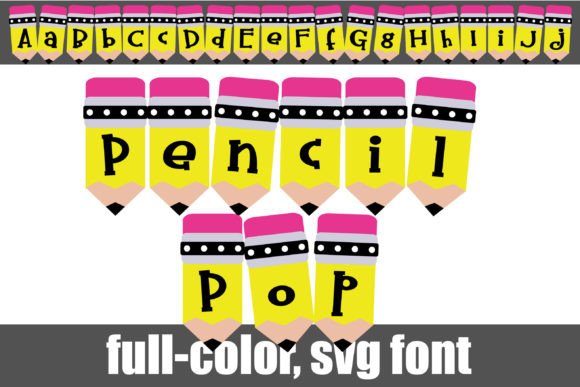
Pencil Pop Font: A Whimsical Serif Font for Creative Designs
The Pencil Pop Font is a full-color font that features whimsical serif lettering in bright yellow pencils, making it perfect for adding a touch of personality to your designs. This font works best for titles, displays, posters, and more, and is compatible with Silhouette Studio. In this article, we’ll explore the benefits of using the Pencil Pop Font and full-color SVG fonts in general, and provide a comprehensive guide on how to use them in your designs.
What is Pencil Pop Font?
The Pencil Pop Font is a unique and creative font that features whimsical serif lettering in bright yellow pencils. This full-color font is perfect for making a statement in your designs, and can be used for a variety of projects, from titles and displays to posters and more.
📸 Preview Images

💡 Click on any image to view full size
One of the key features of the Pencil Pop Font is its compatibility with Silhouette Studio, making it easy to use for crafters and designers who use this software. Additionally, this font is an OpenType full-color (SVG) font, which means it can be installed like any normal .otf font, and is compatible with a range of software, including Adobe products, Quark, and Inkscape.
What are Full-Color SVG Fonts?
Full-color SVG fonts are a type of font that uses scalable vector graphics (SVG) to render the font characters. This allows for a full range of colors and styles to be used, making them perfect for adding a touch of personality to your designs.
Unlike traditional fonts, which are limited to a single color, full-color SVG fonts can be used to create complex and colorful designs. They are also vector-based, which means they can be scaled to any size without losing quality.
Benefits of Using Full-Color SVG Fonts
There are many benefits to using full-color SVG fonts in your designs. Some of the key advantages include:
- Versatility: Full-color SVG fonts can be used for a variety of projects, from logos and branding to web design and print.
- Scalability: Because they are vector-based, full-color SVG fonts can be scaled to any size without losing quality.
- High Quality: Full-color SVG fonts are high-quality and will not lose their resolution when scaled.
- Ease of Use: Full-color SVG fonts are easy to use and can be installed in any software that supports SVG fonts.
How to Use Pencil Pop Font and Full-Color SVG Fonts
Using the Pencil Pop Font and other full-color SVG fonts is easy. Here are the steps to follow:
- Install the Font: Install the font like any normal .otf font. On Mac, this can be done using FontBook, while on Windows, it can be done via the Control Panel.
- Choose a Compatible Program: Make sure you’re using a program that supports full-color SVG fonts, such as Adobe products, Silhouette Studio, Quark, or Inkscape.
- Type in Color: When you type on the document, you should see the font in color. If you see the font as black, it may indicate that your program does not support full-color SVG fonts.
Tips for Using Pencil Pop Font and Full-Color SVG Fonts
Here are some tips for getting the most out of the Pencil Pop Font and other full-color SVG fonts:
- Experiment with Different Sizes: Because full-color SVG fonts are scalable, don’t be afraid to experiment with different sizes to see what works best for your design.
- Play with Colors: Full-color SVG fonts offer a range of colors and styles. Experiment with different colors to find the perfect combination for your design.
- Use for a Variety of Projects: Full-color SVG fonts can be used for a variety of projects, from logos and branding to web design and print. Don’t be afraid to think outside the box and try something new.
Common Issues with Full-Color SVG Fonts
While full-color SVG fonts offer many benefits, there are some common issues to be aware of:
- Compatibility Issues: Not all programs support full-color SVG fonts. If you’re having trouble getting the font to work, it may be due to compatibility issues.
- Color Issues: If you’re seeing the font as black, it may indicate that your program does not support full-color SVG fonts.
Pencil Pop Font: Access Download Now
| Font Name | Pencil Pop Font |
| Author | Illustration Ink |
| Download | Access Download Here |
Conclusion
The Pencil Pop Font is a unique and creative font that features whimsical serif lettering in bright yellow pencils. As a full-color SVG font, it offers a range of benefits, including versatility, scalability, high quality, and ease of use.
By following the tips and guidelines outlined in this article, you can get the most out of the Pencil Pop Font and other full-color SVG fonts, and add a touch of personality to your designs.
FAQs
Q: What is the Pencil Pop Font?
A: The Pencil Pop Font is a full-color font that features whimsical serif lettering in bright yellow pencils.
Q: What programs are compatible with full-color SVG fonts?
A: Programs that support full-color SVG fonts include Adobe products, Silhouette Studio, Quark, and Inkscape.
Q: How do I install the Pencil Pop Font?
A: The Pencil Pop Font can be installed like any normal .otf font, using FontBook on Mac or the Control Panel on Windows.
Q: Why is my font showing as black?
A: If your font is showing as black, it may indicate that your program does not support full-color SVG fonts.
