
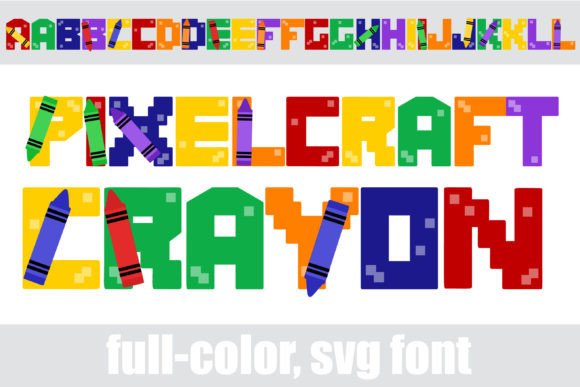
Introducing Pixelcraft Crayon Font: A Vibrant and Versatile Full-Color Font
Are you looking for a font that can add a pop of color and personality to your designs? Look no further than the Pixelcraft Crayon Font, a unique and vibrant full-color font that features a pixelated design with bright colored crayons. In this article, we’ll take a closer look at the features and benefits of this font, and explore how it can be used to enhance your designs.
What is Pixelcraft Crayon Font?
Pixelcraft Crayon Font is a full-color font that features a pixelated design with bright colored crayons. The font comes with an alt case of additional colors for each letter, which can be accessed through your system’s character map. This means that you can use the font to create a wide range of colorful and eye-catching designs, from titles and displays to posters and more.
📸 Preview Images

💡 Click on any image to view full size
One of the key benefits of Pixelcraft Crayon Font is its compatibility with a range of software programs, including Silhouette Studio, Adobe products, Quark, and Inkscape. This makes it easy to use the font in a variety of different contexts, from graphic design and printing to web design and digital art.
Features of Pixelcraft Crayon Font
So what makes Pixelcraft Crayon Font so special? Here are just a few of its key features:
- Full-color design: The font features a vibrant and colorful design, with bright colored crayons that are sure to catch the eye.
- Pixelated style: The font has a unique pixelated style that gives it a fun and playful feel.
- Alt case colors: The font comes with an alt case of additional colors for each letter, which can be accessed through your system’s character map.
- Compatible with Silhouette Studio: The font is compatible with Silhouette Studio, making it easy to use for cutting and crafting projects.
- OpenType full-color (SVG) font: The font is an OpenType full-color (SVG) font, which means that it can be used in any software that supports SVG fonts.
How to Install Pixelcraft Crayon Font
Installing Pixelcraft Crayon Font is easy. Here are the steps:
- Mac users: Install the font via FontBook.
- Windows users: Install the font via your preferred font manager or Control Panel.
Once you’ve installed the font, you can use it in any software that supports SVG fonts.
Benefits of Using Full-Color SVG Fonts
So why choose a full-color SVG font like Pixelcraft Crayon Font? Here are just a few of the benefits:
- Versatility: Full-color SVG fonts are versatile and can be used for a wide range of projects, from logos and branding to web design and print.
- Scalability: SVG fonts are vector-based, which means that they can be scaled to any size without losing quality.
- High-quality: Full-color SVG fonts are high-quality and will not lose their resolution when scaled.
- Easy to use: SVG fonts are easy to use and can be installed in any software that supports SVG fonts.
Tips for Using Pixelcraft Crayon Font
Here are a few tips for getting the most out of Pixelcraft Crayon Font:
- Use it for titles and displays: The font is perfect for titles and displays, where its bright colors and pixelated style can really make an impact.
- Experiment with different colors: The font comes with an alt case of additional colors for each letter, so don’t be afraid to experiment and try out different color combinations.
- Use it for posters and flyers: The font is also great for posters and flyers, where its bold and eye-catching design can help grab attention.
Software Compatibility
Pixelcraft Crayon Font is compatible with a range of software programs, including:
- Adobe products: The font is compatible with Adobe products, such as Photoshop and Illustrator.
- Silhouette Studio: The font is compatible with Silhouette Studio, making it easy to use for cutting and crafting projects.
- Quark: The font is compatible with Quark, a popular design software.
- Inkscape: The font is compatible with Inkscape, a free and open-source design software.
Please note that color fonts may show as black in non-compatible programs.
Pixelcraft Crayon Font: Access Download Now
| Font Name | Pixelcraft Crayon Font |
| Author | Illustration Ink |
| Download | Access Download Here |
Conclusion
In conclusion, Pixelcraft Crayon Font is a unique and versatile full-color font that can add a pop of color and personality to your designs. With its pixelated design, bright colored crayons, and compatibility with a range of software programs, it’s the perfect choice for anyone looking to create eye-catching and engaging designs.
Whether you’re a graphic designer, a crafty DIY enthusiast, or simply someone who loves to create, Pixelcraft Crayon Font is a great addition to your font library. So why not give it a try and see what amazing designs you can create?
FAQs
Here are a few frequently asked questions about Pixelcraft Crayon Font:
- What is Pixelcraft Crayon Font?
- Pixelcraft Crayon Font is a full-color font that features a pixelated design with bright colored crayons.
- Is Pixelcraft Crayon Font compatible with my software?
- Pixelcraft Crayon Font is compatible with a range of software programs, including Adobe products, Silhouette Studio, Quark, and Inkscape.
- How do I install Pixelcraft Crayon Font?
- Installing Pixelcraft Crayon Font is easy. Simply install it via FontBook on a Mac, or via your preferred font manager or Control Panel on Windows.
