
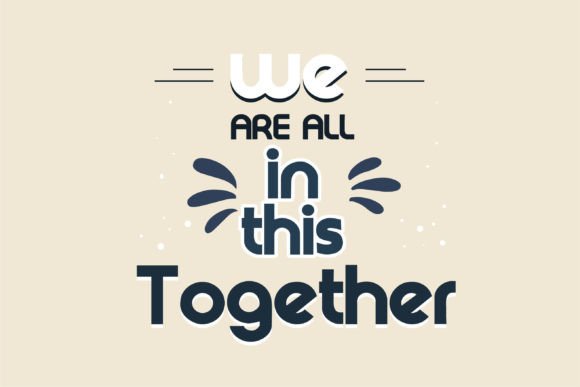
Introducing Right on Font: The Ultimate Retro Sans Serif for Your Design Needs
Are you looking for a font that can add a touch of nostalgia to your designs? Do you want to create eye-catching logos, branding, and quotes that scream retro cool? Look no further than Right on Font, a sans serif font with soft curves that evoke the iconic style of the 1960s.
What is Right on Font?
Right On is a cool retro sans serif font that has soft curves for a rounded, 1960s-like look and feel. It’s the perfect choice for designers who want to add a vintage touch to their work. With its unique and beautiful touch, every letter is designed to make your design come alive.
📸 Preview Images


💡 Click on any image to view full size
Key Features of Right on Font
- Retro Style: Right On has a distinct 1960s vibe that’s perfect for creating designs that are nostalgic and fun.
- Soft Curves: The font features soft curves that give it a rounded, friendly feel.
- Sans Serif: The clean lines and lack of serifs make Right On a versatile font that’s perfect for a wide range of design applications.
- Unique Lettering: Every letter has a unique and beautiful touch that will make your design stand out.
Best Use Cases for Right on Font
Right On is an incredibly versatile font that can be used for a wide range of design projects. Here are some of the best use cases:
- Logos: Create eye-catching logos that are fun, playful, and nostalgic.
- Branding: Use Right On to create branding materials that are unique and memorable.
- Quotes: Add a touch of retro cool to your quotes and sayings with Right On.
- Posters: Create posters that are fun, colorful, and eye-catching with Right On.
- Social Media Graphics: Use Right On to create social media graphics that are engaging and fun.
Tips and Tricks for Using Right on Font
Here are some tips and tricks for getting the most out of Right On:
- Pair with Bold Colors: Right On looks amazing with bold, bright colors. Try pairing it with colors like turquoise, red, and yellow.
- Experiment with Sizes: Right On looks great in a variety of sizes. Experiment with different sizes to find the one that works best for your design.
- Add Texture: Add texture to your design by layering Right On over a background image or texture.
- Play with Ligatures: Right On features beautiful ligatures that can add an extra touch of elegance to your design.
How Right on Font Compares to Other Fonts
Right On is a unique font that stands out from other sans serif fonts. Here’s how it compares to other popular fonts:
- Vs. Helvetica: Right On has a softer, more rounded feel than Helvetica. It’s perfect for designs that need a more playful touch.
- Vs. Arial: Right On has a more unique and distinctive feel than Arial. It’s perfect for designs that need to stand out.
- Vs. Futura: Right On has a more relaxed, casual feel than Futura. It’s perfect for designs that need a more laid-back vibe.
How to Download and Install Right on Font
Downloading and installing Right On is easy. Here’s how:
- Step 1: Click on the download link to get started.
- Step 2: Extract the font files from the zip folder.
- Step 3: Install the font on your computer by double-clicking on the font file and following the prompts.
Right on Font: Access Download Now
| Font Name | Right on Font |
| Author | Unknown |
| Download | Access Download Here |
Conclusion
Right On is a unique and versatile font that’s perfect for designers who want to add a touch of nostalgia to their work. With its soft curves, sans serif design, and unique lettering, Right On is the perfect choice for creating eye-catching logos, branding, and quotes. Download Right On today and start creating designs that are fun, playful, and retro cool!
