
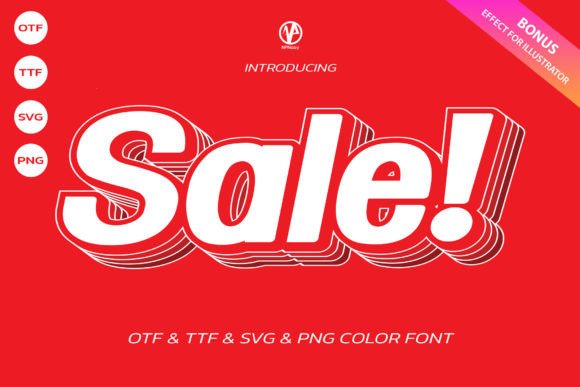
Sale Font: Elevate Your Creations with a Cool and Cute Color Font
Are you looking for a font that can add a touch of excitement and playfulness to your designs? Look no further than Sale Font! This cool and cute color font is suitable for a wide spectrum of applications, from discount sign cards to headlines, stickers, and greeting cards. In this article, we’ll take a closer look at the features and benefits of Sale Font, and explore how you can use it to elevate your creations.
What is Sale Font?
Sale Font is a unique and versatile color font that is designed to add a pop of color and fun to your designs. It’s perfect for creating eye-catching headlines, discount signs, and other promotional materials. The font comes in two versions: a black version and a color version. The black version is compatible with Cricut Design Space and other cutting machines, making it ideal for crafters and makers. The color version, on the other hand, is compatible with certain design programs, including PhotoShop, Illustrator, Silhouette, and Inkscape.
📸 Preview Images

💡 Click on any image to view full size
Key Features of Sale Font
- Cool and Cute Design: Sale Font has a playful and modern design that’s sure to grab attention.
- Color Version: The color version of the font adds an extra layer of creativity and visual interest to your designs.
- Black Version Compatible with Cricut: The black version of the font is compatible with Cricut Design Space and other cutting machines.
- Compatible with Design Programs: The color version of the font is compatible with PhotoShop, Illustrator, Silhouette, and Inkscape.
Uses for Sale Font
Sale Font is a versatile font that can be used for a wide range of applications, including:
- Discount Sign Cards: Create eye-catching discount signs that will grab the attention of your customers.
- Headlines: Use Sale Font to create bold and attention-grabbing headlines for your blog posts, articles, and social media posts.
- Stickers: Create fun and colorful stickers that will add a touch of personality to your designs.
- Greeting Cards: Use Sale Font to create unique and personalized greeting cards for special occasions.
How to Use Sale Font
Using Sale Font is easy! Here are the steps to get started:
- Download the Font: Download the Sale Font files from our website.
- Install the Font: Install the font on your computer or device.
- Choose Your Design Program: Choose the design program you want to use to create your design.
- Select the Font: Select Sale Font from your font library.
- Create Your Design: Create your design using the font.
Tips and Tricks for Using Sale Font
Here are some tips and tricks for getting the most out of Sale Font:
- Experiment with Colors: Experiment with different colors and color combinations to create unique and eye-catching designs.
- Use the Font for Headlines: Use Sale Font for headlines and titles to add a touch of excitement and energy to your designs.
- Combine with Other Fonts: Combine Sale Font with other fonts to create interesting and dynamic designs.
Troubleshooting Common Issues
Here are some common issues you may encounter when using Sale Font, and how to troubleshoot them:
- Font Not Showing Up: Make sure you’ve installed the font correctly and that it’s selected in your design program.
- Color Version Not Working: Make sure you’re using a compatible design program, such as PhotoShop or Illustrator.
Sale Font: Access Download Now
| Font Name | Sale Font |
| Author | NPNaay |
| Download | Access Download Here |
Conclusion
Sale Font is a cool and cute color font that’s perfect for adding a touch of excitement and playfulness to your designs. With its versatility and compatibility with a range of design programs, it’s an ideal choice for crafters, makers, and designers. Whether you’re creating discount sign cards, headlines, stickers, or greeting cards, Sale Font is sure to elevate your creations.
Ultimate Font Guide
For more information on how to use Sale Font and other fonts, check out our Ultimate Font Guide. This comprehensive guide covers everything you need to know about using fonts, from installation to troubleshooting.
Sale Font Specifications
- Font Type: Color Font
- File Format: OTF and/or TTF
- Compatibility: Cricut Design Space, PhotoShop, Illustrator, Silhouette, Inkscape
Download Sale Font
Ready to get started with Sale Font? Download the font files now and start creating!
