
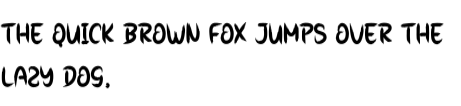
Unleash the Fear: Exploring the Scary Spooky Font
The Scary Spooky font is a fun, handwritten typeface that exudes a playful yet eerie vibe, reminiscent of the spookiest of Halloween nights. This font, designed to resemble brush-written letters, brings a whimsical touch to any design project. Its bold and slightly uneven strokes give it a hand-crafted feel, making it perfect for those looking to add a dash of fright to their creations.
The Origins of Scary Spooky Font
The Scary Spooky font was created with the intention of capturing the essence of spooky, fun, and playful typography. Designers often seek fonts that can convey a specific mood or atmosphere, and the Scary Spooky font does just that. Its unique, brush-like appearance makes it stand out from more conventional fonts, offering a fresh and distinctive look.
📸 Preview Images


💡 Click on any image to view full size
Key Features of Scary Spooky Font
- Handwritten Style: The font boasts a handwritten, brush-like quality that gives it a personal and artistic feel.
- Playful yet Spooky: It strikes the perfect balance between being fun and eerie, making it ideal for Halloween-themed projects or any design that requires a spooky touch.
- Bold and Uneven Letters: The boldness of the letters, combined with their slight unevenness, adds to the font’s whimsical and hand-crafted appeal.
Uses of Scary Spooky Font
The versatility of the Scary Spooky font makes it suitable for a wide range of projects. Here are some of the most popular uses:
Popular Use Cases
- Halloween Events and Parties: Create spooky invitations, banners, and decorations that set the tone for a thrilling Halloween experience.
- Horror and Thriller Content: Enhance your horror stories, movie scripts, or book covers with a font that promises a spine-tingling experience.
- Creepy Crafts and DIY Projects: Add a personal touch to your spooky crafts, such as Halloween cards, party favors, or haunted house decorations.
- Graphic Design and Branding: Use the Scary Spooky font in graphic design projects that require a unique and captivating typeface, such as logos, posters, or social media graphics.
Tips for Using Scary Spooky Font
To make the most out of the Scary Spooky font, consider the following tips:
Design Tips
- Mix and Match: Combine the Scary Spooky font with other fonts to create a contrasting and visually appealing design.
- Adjust Size and Color: Experiment with different sizes and colors to make the font stand out or blend in with your design.
- Add Effects: Consider adding textures, shadows, or other effects to enhance the spooky feel of the font.
Where to Find Scary Spooky Font
The Scary Spooky font can be found on various font repositories and design marketplaces. Some popular sources include:
Popular Font Sources
- Font Bundles: Websites like Font Bundles offer a wide range of fonts, including the Scary Spooky font, often at affordable prices.
- Design Marketplaces: Platforms like Creative Market and Etsy feature unique and creative fonts, including the Scary Spooky font.
- Google Fonts: While not all fonts are available on Google Fonts, it’s worth checking if the Scary Spooky font is listed.
Scary Spooky Font: Access Download Now
| Font Name | Scary Spooky Font |
| Author | Unknown |
| Download | Access Download Here |
Conclusion
The Scary Spooky font is a unique and versatile typeface that can add a touch of fright to any design project. Its playful yet spooky style, combined with its bold and uneven letters, makes it perfect for Halloween-themed projects or any design that requires a whimsical touch. By understanding its features, uses, and design tips, you can make the most out of this font and create captivating designs that leave a lasting impression.
