
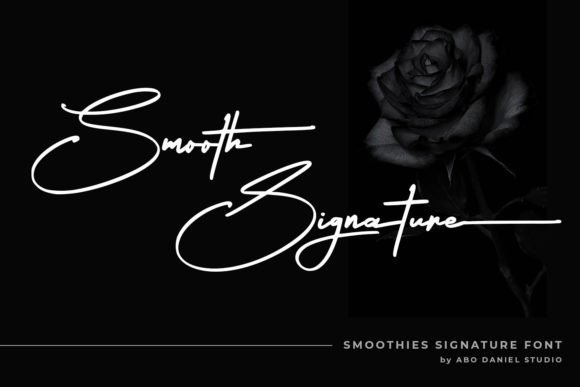
Smooth Signature Font: Elevate Your Designs with Elegance
In the world of typography, a signature font can make all the difference in adding a touch of elegance and sophistication to your designs. One such font that has been making waves in the design community is the Smooth Signature Font. This stylish and delicate script font has a clean, thin, and smooth vibe that is sure to elevate any design it’s added to. In this article, we’ll dive deeper into the features and benefits of Smooth Signature Font and explore how it can become an indispensable part of your design toolkit.
What Makes Smooth Signature Font Stand Out?
Smooth Signature Font boasts a range of features that set it apart from other script fonts on the market. Here are some of its key characteristics:
📸 Preview Images


💡 Click on any image to view full size
- Clean and Thin Lines: The font’s clean and thin lines give it a sleek and modern look that’s perfect for designs that require a touch of sophistication.
- Smooth Vibe: The font’s smooth vibe makes it ideal for creating elegant and refined designs that exude luxury and style.
- PUA Encoded: Smooth Signature Font is PUA (Private Use Area) encoded, which means you can access all the glyphs and swashes with ease. This feature makes it incredibly versatile and user-friendly.
Endless Design Possibilities with Smooth Signature Font
The versatility of Smooth Signature Font makes it suitable for a wide range of design applications. Here are some ideas to get you started:
- Logos and Branding: Use Smooth Signature Font to create stunning logos and branding materials that exude elegance and sophistication.
- Wedding and Event Stationery: Add a touch of luxury to your wedding and event stationery with Smooth Signature Font’s delicate and refined lines.
- Packaging Design: Elevate your packaging design with Smooth Signature Font’s clean and modern look.
- Digital Media: Use Smooth Signature Font in your digital media, such as social media graphics, blog headers, and email newsletters, to add a touch of elegance and refinement.
Tips for Working with Smooth Signature Font
To get the most out of Smooth Signature Font, here are some typography tips to keep in mind:
- Pair it with Bold Fonts: Pair Smooth Signature Font with bold fonts to create a striking contrast that adds visual interest to your design.
- Experiment with Colors: Don’t be afraid to experiment with different colors to find the perfect match for your design.
- Use Swashes and Glyphs: Take advantage of Smooth Signature Font’s PUA encoding to access a range of swashes and glyphs that can add a touch of elegance to your design.
Pairing Smooth Signature Font with Other Fonts
Pairing Smooth Signature Font with other fonts can create a beautiful and harmonious design. Here are some font pairing suggestions:
- Montserrat: Pair Smooth Signature Font with Montserrat for a clean and modern look.
- Lato: Combine Smooth Signature Font with Lato for a elegant and refined design.
- Playfair Display: Pair Smooth Signature Font with Playfair Display for a luxurious and sophisticated look.
Accessing Smooth Signature Font Features
To access the features of Smooth Signature Font, including swashes and glyphs, follow these steps:
- Install the Font: Install Smooth Signature Font on your computer or device.
- Open Your Design Software: Open your design software, such as Adobe Illustrator or Canva.
- Select the Font: Select Smooth Signature Font from your font library.
- Access Features: Access the font features, including swashes and glyphs, using the software’s built-in features.
Smooth Signature Font is a versatile and elegant script font that can elevate any design it’s added to. With its clean and thin lines, smooth vibe, and PUA encoding, it’s the perfect choice for designers looking to add a touch of sophistication to their work. By following the tips and suggestions outlined in this article, you can unlock the full potential of Smooth Signature Font and take your designs to the next level.
Smooth Signature Font: Access Download Now
| Font Name | Smooth Signature Font |
| Author | Unknown |
| Download | Access Download Here |
