
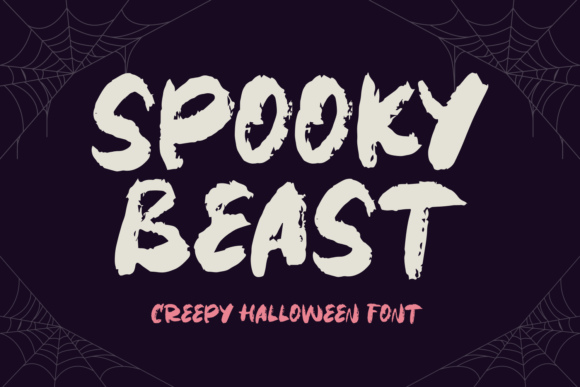
Spooky Beast Font: The Ultimate Halloween Typeface for a Terrifyingly Good Time
As the witching hour approaches, and the spookiest night of the year draws near, the quest for the perfect Halloween font begins. Look no further than Spooky Beast, the quintessential typeface that will breathe life into your terrifying Halloween soirees. Whether you’re planning a hauntingly good time for your friends and family or aiming to create web graphics that send shivers down the spine, Spooky Beast is the ideal choice.
What Makes Spooky Beast the Perfect Halloween Font?
- Creepshow Charm: Spooky Beast boasts a creepy yet enchanting design that will leave a lasting chill on all who lay eyes on it.
- Versatility: Perfect for invitations, web graphics, and any Halloween décor you have in mind, this font is sure to make your spooky celebrations unforgettable.
- Easy Installation: With a straightforward installation process, you can bring your eerie Halloween dreams to life in no time.
Bringing Spooky Beast to Life: Halloween Uses Galore
Spooky Beast is more than just a font – it’s an experience. Imagine being able to create:
📸 Preview Images

💡 Click on any image to view full size
- Haunting Invitations: Set the tone for your Halloween party with invitations that are as spooky as they are inviting.
- Eerie Web Graphics: Send shivers down your website visitors’ spines with graphics that leap off the screen.
- Spine-Chilling Décor: From banners to posters, Spooky Beast is the perfect addition to your Halloween decorations.
How to Install Spooky Beast Font: A Step-by-Step Guide
Getting started with Spooky Beast is as easy as a ghostly whisper. Follow these simple steps:
- Download the Font: Get your hands on the Spooky Beast font file.
- Extract the Files: Unzip the file to access the font files.
- Install the Font: Right-click on the font file and select ‘Install’ or move it to your computer’s font directory.
- Use in Your Designs: Start creating your spooky masterpieces with Spooky Beast.
Design Tips for Using Spooky Beast Font
To make the most out of Spooky Beast, consider these design tips:
- Mix and Match: Combine Spooky Beast with other Halloween-themed fonts for a unique look.
- Play with Colors: Stick to a dark color palette to enhance the spooky effect or go bold with bright Halloween colors.
- Add Graphics: Incorporate Halloween-themed graphics to complement the font.
Finding Inspiration: Spooky Beast in Action
Still unsure how to use Spooky Beast? Here are some spook-tacular ideas to get you started:
- Halloween Party Invites: Design invites that look like ancient cursed scrolls or haunted mansion plaques.
- Web Graphics: Create animated GIFs or banners that seem to move and haunt your website visitors.
- Social Media Posts: Use Spooky Beast to create posts that announce your Halloween party or share spooky tales.
Conclusion: Unleash the Spookiness with Spooky Beast Font
Spooky Beast is more than just a Halloween font – it’s a key to unlocking a world of eerie elegance and haunting beauty. With its creepy charm, versatility, and ease of use, it’s the perfect addition to any Halloween celebration or design project. So why wait? Download Spooky Beast today and breathe life into your terrifying Halloween soirees.
Get Spooky Beast Now!
Ready to make your Halloween designs scream with Spooky Beast? Click the link below to download and start creating your spookiest masterpieces yet!
Spooky Beast Font: Access Download Now
| Font Name | Spooky Beast Font |
| Author | Unknown |
| Download | Access Download Here |
