
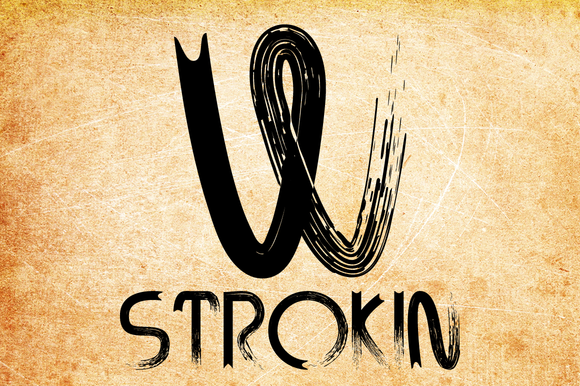
Introducing Strokin Font: The Ultimate Omnicare Display Font
Are you tired of using the same old fonts for your creative projects? Look no further than Strokin Font, an inky, messy, and highly versatile Omnicare display font that’s sure to add a unique touch to your designs. In this article, we’ll take a closer look at the features and benefits of Strokin Font, and explore how it can help take your typography to the next level.
What is Strokin Font?
Strokin Font is a one-of-a-kind display font that’s part charcoal, part paint strokes. Its unique texture and appearance make it perfect for adding a touch of personality to your designs. Whether you’re working on a branding project, a poster, or a website, Strokin Font is sure to make a statement.
📸 Preview Images


💡 Click on any image to view full size
One of the standout features of Strokin Font is its ability to transform depending on the tone and color used. When reversed in lighter tones, it takes on a chalk-like appearance, while adding a splash of red gives it a bold, blood-like look. This versatility makes it an excellent choice for designers who want to create a specific mood or atmosphere in their work.
Key Features of Strokin Font
- Inky, messy texture: Strokin Font has a unique, hand-crafted feel that’s perfect for adding a touch of personality to your designs.
- Omnicare display font: Strokin Font is designed to be highly legible, even at large sizes, making it perfect for use in headlines, titles, and other display text.
- Glyphs and foreign features: Strokin Font includes a wide range of glyphs and foreign features, making it an excellent choice for designers who work with international clients or need to create multilingual content.
- OpenType coded: Strokin Font is coded with OpenType, which allows for automatic letter pairing and ligatures, giving your text a more randomized, bespoke feel.
The Benefits of Using Strokin Font
So why should you choose Strokin Font for your next design project? Here are just a few benefits of using this unique and versatile font:
- Adds personality to your designs: Strokin Font is a true showstopper, and is sure to add a touch of personality to your designs.
- Highly versatile: Strokin Font can be used in a wide range of design applications, from posters and flyers to websites and branding materials.
- Easy to use: Despite its complex appearance, Strokin Font is surprisingly easy to use, and can be easily integrated into your design workflow.
- Supports multiple languages: With its wide range of glyphs and foreign features, Strokin Font is an excellent choice for designers who need to create multilingual content.
How to Use Strokin Font in Your Designs
So how can you start using Strokin Font in your designs? Here are a few tips and tricks to get you started:
- Experiment with different colors: Strokin Font looks amazing in a wide range of colors, so don’t be afraid to experiment and find the perfect hue for your design.
- Use it for headlines and titles: Strokin Font is perfect for use in headlines and titles, where its unique texture and appearance can really make an impact.
- Pair it with other fonts: Strokin Font can be paired with a wide range of other fonts to create a unique and visually appealing typography scheme.
- Take advantage of OpenType features: Strokin Font’s OpenType coding allows for automatic letter pairing and ligatures, giving your text a more randomized, bespoke feel.
Strokin Font: Access Download Now
| Font Name | Strokin Font |
| Author | Unknown |
| Download | Access Download Here |
Conclusion
In conclusion, Strokin Font is an incredible Omnicare display font that’s sure to add a unique touch to your designs. With its inky, messy texture, versatile appearance, and wide range of features, it’s the perfect choice for designers who want to create something truly special. Whether you’re working on a branding project, a poster, or a website, Strokin Font is sure to make a statement.
Technical Specifications
- Font family: Strokin Font
- Font style: Omnicare display font
- Glyphs: Includes a wide range of glyphs and foreign features
- OpenType coding: Yes
- File format: OTF
Frequently Asked Questions
- What is Strokin Font?: Strokin Font is an inky, messy, Omnicare display font that’s perfect for adding a unique touch to your designs.
- What file format is Strokin Font available in?: Strokin Font is available in OTF format.
- Does Strokin Font include glyphs and foreign features?: Yes, Strokin Font includes a wide range of glyphs and foreign features.
- Is Strokin Font easy to use?: Yes, Strokin Font is surprisingly easy to use, and can be easily integrated into your design workflow.
